

Key Takeaways
- Different layers: A VPN SDK runs the tunnel on the device. A VPN API runs accounts on your server.
- Most apps need both: The API provisions users, and the SDK connects them inside the app.
- Keys stay server-side: 71% of sampled iOS apps leak a hardcoded secret, so never ship a partner key.
- SDKs follow store deadlines: Apple and Google set yearly build rules, and Play limits which apps may tunnel.
- Routers and devices fit the API: Firmware dials the server directly, with no app store review on the tunnel.
Quick Answer: A VPN SDK runs the encrypted tunnel inside your app on the user’s device. A VPN API manages accounts, status, and server lookups from your own backend. Most phone and desktop apps need both, while routers and connected devices often need only the API.
Most engineering teams treat VPN SDK vs VPN API as a tooling preference. In practice, it is an ownership decision. The choice sets who maintains tunnel code, who carries store risk, and where secret keys live.
A wrong pick rarely fails on launch day. Instead, it fails at the first operating system update, the first store rejection, or the first leaked key. Cybernews researchers found that 71% of sampled iOS apps leak at least one hardcoded secret. The average app exposed more than five. A VPN API key shipped inside an app joins that list. Anyone with the app file can then extract it.
This VPN SDK vs VPN API guide compares both paths on the factors that decide total cost. It covers device scope, release cadence, credential handling, store eligibility, revocation speed, and compliance duty. It closes with three integration patterns that hold up in production.
What a Wrong VPN SDK vs VPN API Choice Costs
A wrong integration path does not arrive as one bill. Instead, it shows up as rework spread across the next four quarters. Four costs land on the engineering roadmap first.
- Yearly toolchain deadlines: Since April 28, 2026, Apple only accepts uploads built with its current developer toolset. Since August 31, 2026, Google Play requires new apps and updates to target Android 16. Every SDK inside your app must keep pace with both deadlines, every year.
- Store eligibility: Google Play only allows device-level tunnels in apps where VPN is core functionality or a listed exception. As a result, an SDK added to an unrelated app can fail review outright.
- Key exposure: A partner secret key inside client code hands your account plan to anyone holding the app file. The Cybernews data above shows how often that happens.
- Compliance reporting: The EU Cyber Resilience Act made vulnerability reporting mandatory from September 11, 2026. That duty covers actively exploited flaws in third-party components inside your product, including an embedded SDK.
Consider an illustrative case with round numbers. Two engineers spend one quarter building a custom tunnel client on top of an API. At $15,000 per engineer per month, that build costs $90,000. Later, a store rule or system update may force a move to an SDK. Most of that spend is then gone. This math is illustrative, not a benchmark.
So make the call during architecture review. A rejected build should not be the thing that forces it.
What Each Path Actually Does
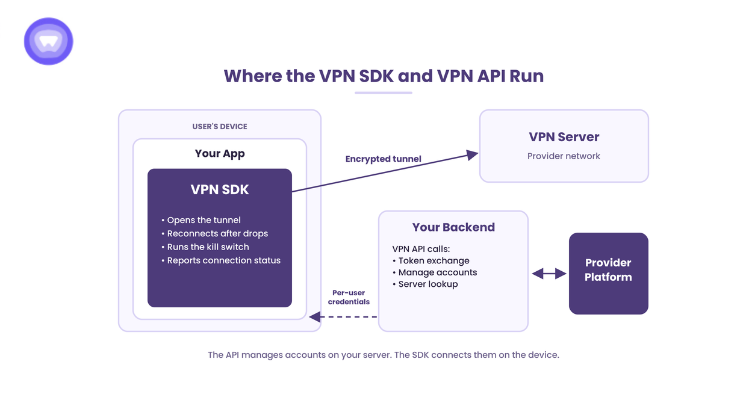
The two terms get used loosely, so it helps to sort them by where the code runs. One sits on the device. The other sits on your server.
The SDK Runs the Tunnel on the Device
A VPN SDK is a library your team compiles into the app. It opens the encrypted tunnel, tracks connection states, and reconnects after network changes. It also handles kill switch behavior and split tunneling where the vendor supports them.
Your app calls a small set of functions, such as connect, disconnect, and read status. Meanwhile, the vendor maintains the protocol code, so your team never writes encryption logic. In exchange, the SDK becomes a dependency that ships inside every build.
The API Runs the Account Layer on Your Server
A VPN API is a set of web endpoints your backend calls over an encrypted connection. A typical flow starts with a secret key from the partner console. Your server trades that key for a short-lived access token. It then creates a VPN account and receives credentials for that user.
After that, the API runs the account lifecycle. Common endpoints extend expiry, suspend, re-enable, upgrade, and delete accounts. A server lookup endpoint returns the best server address for each connection.
However, the API alone does not open a tunnel. Something on the device must dial the server with those credentials. That component is an SDK, the operating system’s built-in VPN client, or device firmware.
Most Production Apps Use Both
For phone and desktop apps, VPN SDK vs VPN API is rarely an either-or choice. The backend uses the API to create and manage accounts. The app uses the SDK to connect. Between them, the provisioning pipeline keeps billing and access in sync.
VPN SDK vs VPN API: Side-by-Side Comparison
The table below compares both paths on the factors that change engineering cost. Protocol names appear here for reference only.
| Factor | VPN SDK | VPN API |
| Where it runs | Inside your app, on the user’s device | On your backend servers |
| What it handles | Tunnel setup, reconnects, kill switch, connection states | Token exchange, account lifecycle, inventory, server lookup |
| Who builds the tunnel client | The vendor | Your team, the OS built-in client, or device firmware |
| Protocol handling | Vendor-maintained WireGuard, OpenVPN, IKEv2, or IPSec | You dial WireGuard, OpenVPN, IKEv2, or IPSec yourself |
| Server selection | On-device latency test across nearby data centers | Latitude and longitude sent to a server lookup |
| Release dependency | Ships inside your app and follows store toolchain deadlines | Deploys server-side with no store review |
| Secret key location | Never in the app when paired with a backend | Must stay on your server |
| Store policy exposure | VPN eligibility rules apply to the host app | Applies only if you also ship a client app |
| Best fit | iOS, Android, Windows, and macOS apps | Routers, smart TVs, gateways, dashboards, firmware |
Five Factors That Decide the Integration Path
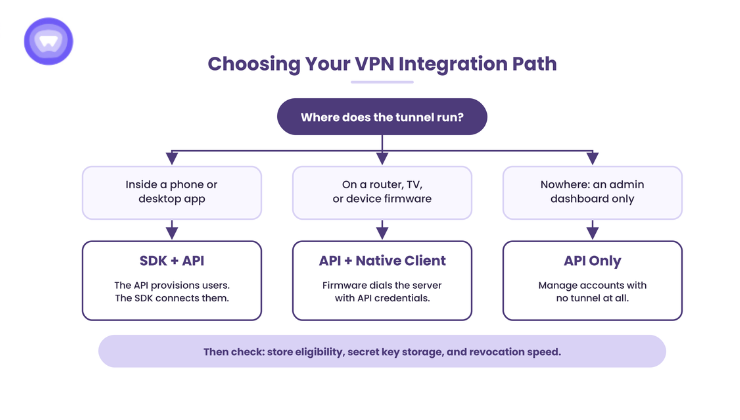
Feature lists look alike across vendors, so the VPN SDK vs VPN API decision turns on constraints instead. Work through these five factors in order. Each one can rule out a path on its own.
1. Where the Tunnel Runs
Start with the device list, because it removes options fastest.
- Phones, tablets, and laptops running your app fit the SDK path.
- Routers, smart TVs, game consoles, and network gateways fit the API path with a native protocol client.
- Admin dashboards that manage accounts but never connect need only the API.
Many smart TVs and consoles cannot install a VPN app at all. Therefore, a router-level tunnel built on the API covers them instead.
2. Who Owns the Release Calendar
SDK updates reach users only through app updates. So every vendor security patch waits for your next build, store review, and staged rollout. API changes, by contrast, deploy server-side with no store review.
That said, the API path moves tunnel upkeep onto your team. Your engineers then own protocol patches, reconnect logic, and leak testing on every device type. Ask any SDK vendor for its release cadence and advisory process in writing.
3. Where the Secret Key Lives
The partner secret key belongs on your server only. Your backend requests tokens and creates accounts, then passes the app only per-user credentials. Two sign-in models follow from that split.
- Platform-issued credentials: The API returns a username and password for each VPN account, and the app connects with them.
- Mapped sign-in: Your backend links those credentials to the user’s existing login, so users never see a second password.
Some SDKs also support a backend-free mode. In that mode, the app passes a unique user ID and connection settings, and the SDK generates credentials. This suits small teams, but it places more trust in the client.
4. Whether the App Qualifies for a Device-Level Tunnel
Google Play requires a declaration from every app that uses its VPN service. A productivity or finance app adding VPN must show VPN as core functionality or fit an exception. Apple also ties VPN apps to organization developer accounts, a gate covered in this deployment timeline.
An API-only build for routers avoids both store gates. In that setup, no phone app opens the tunnel.
5. How Fast Revocation Reaches the Device
When a subscription lapses, access must end on the device quickly. First, the API disables the account on the server. Next, the SDK needs to learn about it and drop the live session.
Webhooks push that change within seconds, while polling waits for the next check interval. That gap matters for audited clients, as this revocation decision breakdown shows.
How Server Selection Differs Between the Two Paths
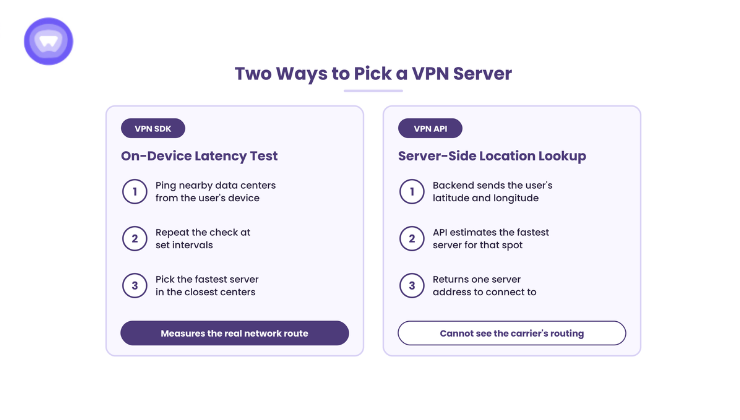
Server choice is a quiet but real difference in the VPN SDK vs VPN API comparison. On one documented white label platform, the SDK pings nearby data centers from the device. It repeats that check at intervals, then picks the fastest server inside the closest centers.
The server-side method works differently. Your backend sends latitude and longitude, and the API estimates the fastest server for that spot. However, that estimate cannot see the user’s actual network path.
For example, a mobile carrier may route traffic through a distant hub. A location-based pick then looks close on a map but performs like a distant server. The on-device test measures the real route instead. Teams on the API path can close this gap by running their own latency checks on the device.
Who Owns Compliance Under the Cyber Resilience Act
Since September 11, 2026, manufacturers selling digital products in the EU must report actively exploited vulnerabilities. That duty covers flaws inside third-party components, such as an embedded VPN SDK. The full security requirements follow on December 11, 2027.
The two paths split this duty in different ways.
- SDK path: The vendor writes the tunnel code, but the app maker still reports exploited flaws inside it. So get the vendor’s advisory feed, support period, and patch timelines in writing.
- API path with your own client: Your team owns the tunnel code outright. Therefore, your team also finds, fixes, and reports its flaws.
- API path with device firmware: Router and device makers carry the same duty for the firmware they ship.
Either way, a component list per release turns a short reporting window into a lookup. Without one, every alert becomes an investigation.
Three Integration Patterns That Hold Up in Production
Most deployments settle into one of three shapes. Each one maps the five factors above to a working VPN SDK vs VPN API architecture.
- Consumer or SaaS app on phones and desktops: The backend uses the API for accounts and billing sync. The app embeds the SDK for the tunnel. This fits most products adding VPN to an existing app.
- Router, smart TV, or connected device: Firmware dials the server with API-issued credentials through a built-in protocol client. No phone app exists, so no store review touches the tunnel.
- Startup app with no backend yet: The SDK runs in backend-free mode with a unique user ID. It ships fast, and the team can add a backend and the API later.
Building the tunnel layer in-house instead adds months before the first user connects. This build versus buy comparison lays out that gap in detail.
What the Evidence Shows
Two published partner case studies show each path at scale.
On the SDK path, a privacy-focused digital company moved its active users onto white label VPN infrastructure. Its SDK integration started with 100,000 users as a validation phase. Within a few months, it had migrated more than 500,000 users with no reported service interruptions.
On the API path, a router maker embedded VPN into its hardware through APIs. That move covered smart TVs and consoles that lacked app support. The company reported 9x growth in average revenue per user and over 110,000 monthly active users. It also estimated an in-house build would have taken about a year.
Both sets of figures come from the partners’ own reporting, published as case studies. They are not independently audited.
How PureWL Supports Both Integration Paths
PureWL offers native SDKs for iOS, Android, Windows, and macOS, plus a provisioning API on the same platform. The API covers token exchange, account lifecycle, inventory, and server lookup. The SDK adds on-device data center pinging and a backend-free mode, documented on the SDK and API page.
PureWL reports 6,500+ servers across 88+ countries and 150+ partners. These are PureWL’s own figures, not third-party audited data. The no-log policy carries a separate KPMG audit, which security reviewers can request early.
Conclusion
VPN SDK vs VPN API is an ownership decision dressed as a tooling choice. The SDK owns the tunnel on the device. The API owns accounts on your server. Phone and desktop apps usually need both, while routers and connected devices often need only the API. Settle device scope, release ownership, key storage, and store eligibility before writing integration code. Then test any vendor with the right questions before you sign.
Request API sandbox access for a 20-minute integration walkthrough.
Frequently Asked Questions
What is the difference between a VPN SDK and a VPN API?
A VPN SDK runs the encrypted tunnel inside your app, while a VPN API manages accounts from your server.
Can I use a VPN API without an SDK?
Yes. Routers, smart TVs, and gateways often pair the API with a built-in protocol client instead.
Which launches faster, a VPN SDK or a VPN API?
An embedded SDK ships faster because it skips a new store listing and rides an existing app update.
Is it safe to put a VPN API key inside a mobile app?
No. Cybernews found 71% of sampled iOS apps leak a hardcoded secret, so the key stays server-side.
Can any Android app embed a VPN SDK?
No. Google Play permits device-level tunnels only where VPN or a listed exception is the core function.