
Quick Answer: To add a VPN to a mobile app, embed a white label VPN SDK for iOS and Android, provision users through a backend API, and submit the update with the store’s VPN declarations. The SDK provider runs the servers and tunnel code. Your team handles the UI, billing and store review.
Product teams hear “can we add a VPN?” more often than they used to. The request sounds like one feature. Scoped properly, it covers a global server network, several protocols, two platform-specific tunnel frameworks, account management and ongoing maintenance. PureWL’s deployment guide estimates that building from scratch takes 12 to 18 months before a customer connects.
A white label VPN changes that. This guide covers what the integration involves on iOS and Android, where launches stall, and how to plan a realistic timeline. It draws on PureWL’s public SDK documentation and the store policies themselves.
What “Adding a VPN” Means on iOS and Android
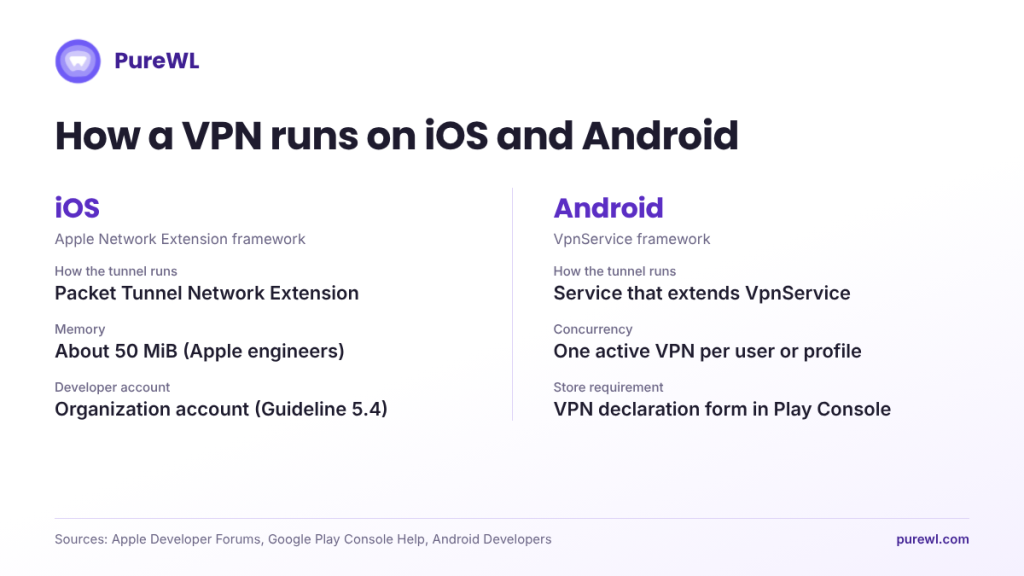
Both platforms provide their own VPN framework, and they work differently.
On iOS, a VPN runs inside a Packet Tunnel Network Extension. Apple’s developer support engineers have reported a 50 MiB memory limit for packet tunnel providers since iOS 15. They also note that these limits have changed in the past and may change again. Their advice is to test the provider on a wide range of devices and OS versions.
On Android, the VPN runs through a service that extends VpnService. Android’s VPN guide states that only one VPN service is active per user or profile, and starting a new one stops the existing one. If another VPN app takes over, your tunnel stops.
Build In-House or Use a White Label VPN SDK?
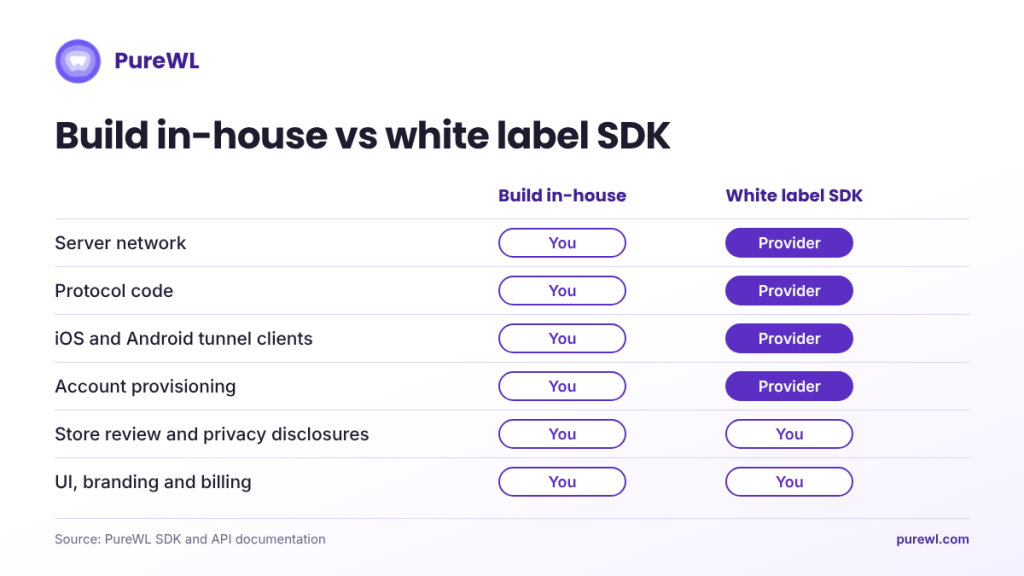
| What you take on | Build in-house | White label VPN SDK |
|---|---|---|
| Server network and capacity | Yours | Provider’s |
| Protocol code (WireGuard, OpenVPN, IKEv2) | Yours | Provider’s |
| iOS and Android tunnel clients | Yours | SDK handles it |
| Account provisioning | Yours | Provider’s API |
| Store review and privacy disclosures | Yours | Yours |
| UI, branding and billing | Yours | Yours |
| Time to launch (PureWL estimates) | 12 to 18 months | About 2 to 4 weeks, embedded SDK |
Store compliance stays with you either way, because the listing sits under your developer account. The SDK removes the infrastructure and protocol work, not the review process.
Step 1: Check Store Eligibility Before You Write Code
This step decides whether your plan works, so do it first.
Apple. App Store Review Guideline 5.4 says apps offering VPN services must use the NEVPNManager API and may only be offered by developers enrolled as an organization. Apple’s developer support engineers have pointed developers to this clause on the Apple developer forums when asked about individual accounts.
Google Play. Only apps that use VpnService and have VPN as their core functionality can create a device-level tunnel. Exceptions include device security, parental control, enterprise management, network tools such as remote access, and carrier apps. Every app using VpnService must complete the VPN declaration form in Play Console. It asks whether VPN is your core function and, if not, which permitted category applies. It can also require a short demo video. The app must show a prominent in-app disclosure with affirmative user consent, and must encrypt traffic from the device to the tunnel endpoint.
For a fintech, productivity or media app, this matters a great deal. If VPN is not your core function and your app is not in a listed category, an embedded VPN can fail Play review. PureWL’s own SDK vs API guide makes the same point. In that case, a branded standalone VPN app is the alternative.
Step 2: Choose Your Integration Model
PureWL’s developer platform supports four setups:
- Your own backend. Your server talks to PureWL’s API, validates users and issues VPN credentials.
- No backend. You pass connection parameters to the SDK, and PureWL handles the rest.
- Manual accounts. You create accounts by hand in the Reseller Panel.
- Unique-ID mode. You supply a unique ID per user and the SDK generates the credentials.
PureWL’s guidance is to keep provisioning API keys on your server, never inside the app. For the tradeoffs between the two layers, see VPN SDK vs VPN API.
Step 3: Install the SDK
Android. The SDK needs Android 7.0 (API 24) or later, Java 17, Kotlin 2.0 or higher and AndroidX. You add the repositories and one Gradle dependency, then initialize the SDK once in your Application class’s onCreate. It is a singleton, so initialize it before calling anything else. See the Android SDK docs.
iOS. The SDK needs iOS 13 or later and Xcode 15.3. WireGuard needs iOS 15 or later. Install through Swift Package Manager or CocoaPods. The documentation then has you add two Packet Tunnel Network Extension targets, one for OpenVPN and one for WireGuard. Each needs the App Groups and Network Extensions capabilities and the same signing team as your main app. The WireGuard extension also builds a Go-based bridge as a separate build target. See the iOS SDK docs.
Protocols. Both SDKs support WireGuard (recommended), OpenVPN over UDP and TCP, and IKEv2. The iOS SDK also supports IPSec. If you leave the protocol unset when connecting by country, city or channel, the SDK uses a recommended one.
Step 4: Authenticate Users and Connect
Both SDKs initialize with a secret key issued with your subscription. You then pass per-user VPN credentials, created in the admin panel or through the API, and call connect with a country and protocol. The SDK reports state through callbacks, including connecting, connected, paused, redialing, dial error and disconnected, which you map onto your UI.
The documented connection options include:
- Failover to the nearest server if the requested one is busy or missing, on by default.
- Auto-retry across up to three protocols if the first fails.
- A recommended location based on the user’s position.
- An offline inventory file so country and protocol lists load without a network connection.
The documentation also lists these optional features:
- Split tunneling and reverse split tunneling on Android, by app package.
- On-demand rules on iOS, which connect or disconnect automatically on specified Wi-Fi networks or cellular.
- Pause and resume, with timed pauses.
- A tracker and ad blocker that runs over the VPN connection.
- Local network access, so users can still reach devices on their LAN.
Step 5: Connect Billing and Account Status
Your backend should create a VPN account when a user subscribes, suspend it when payment fails and remove it on cancellation. PureWL’s authentication and revocation guide notes that webhooks push account changes within seconds, while polling waits for the next check. Test failed payments and cancellations before launch.
Step 6: Test Before You Submit
Before you submit, test:
- Network changes, such as Wi-Fi to cellular, since PureWL’s case study lists auto-reconnect across network changes as a key requirement.
- iOS tunnel memory on a range of devices and OS versions, as Apple’s engineers advise.
- Android VPN slot loss, when another VPN app starts and stops yours.
- 16 KB page support. Google Play requires apps targeting Android 15 or later to support 16 KB memory pages on 64-bit devices. From February 1, 2027, updates that do not support them cannot be released. Ask your provider which SDK version supports this.
Step 7: Submit and Plan the Timeline
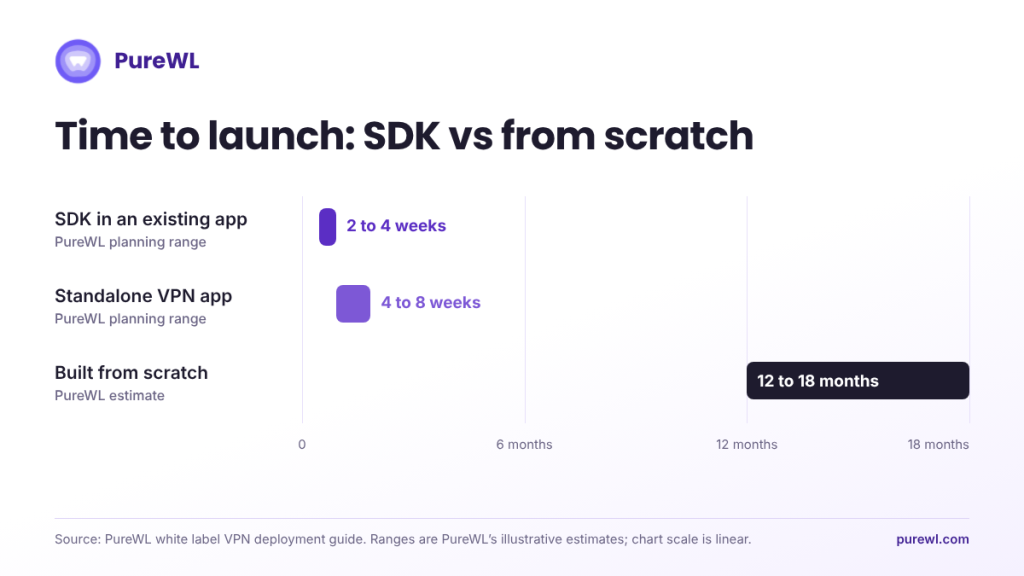
Store submission sets the launch date. On Apple’s side, use an organization account and complete your privacy label, which sits under your developer account. On Google’s side, file the VPN declaration with your disclosure and any required video.
PureWL’s deployment guide gives these planning ranges. The guide labels them illustrative, not guarantees:
| Path | PureWL planning range |
|---|---|
| SDK embedded in an existing app | 2 to 4 weeks |
| Branded standalone VPN app | 4 to 8 weeks |
| Building from scratch | 12 to 18 months |
According to the same guide, the provider-side build takes days. Store accounts, VPN-specific store review, internal vendor and legal review, and billing integration set the rest of the timeline. It recommends opening all four from day one.
Mistakes That Stretch a Launch
- Choosing an embedded SDK that Play will not approve. Check eligibility first.
- Ignoring 16 KB support. An SDK with native code that fails the check can block your Android updates after the deadline.
- Choosing on headline price alone. Compare usage-based billing against your own data. See white label VPN pricing models.
- Skipping vendor due diligence. Use a vendor checklist before you sign.
What the Evidence Shows
A mobile app development company serving communication, fintech and productivity apps embedded PureWL’s SDKs across Android, iOS, macOS and Windows. Its published case study reports that 40% of users enabled the VPN in their first session after the update. It also reports connections about 22% faster than standalone VPN apps. These figures come from the partner’s own reporting and have not been independently audited.
How PureWL Fits
PureWL provides native SDKs for iOS, Android, Windows and macOS, a provisioning API, a central control panel and technical documentation, with public demo apps on GitHub. PureWL states that it has over 6,500 servers worldwide and a 99.99% uptime SLA, and that KPMG audited its no-log policy. These are PureWL’s own statements, so ask for the audit scope document during security review. See the white label VPN page, the VPN SDKs and APIs, VPN SDK providers compared, and the embedded VPN build-versus-buy guide.
Conclusion
You do not need to build a VPN to offer one. A white label SDK takes on the servers, protocols and tunnel clients, so your team works in weeks instead of the year or more a custom build needs. The remaining work is store eligibility, testing and billing, and teams that plan for it launch sooner.
Request API sandbox access for a 20-minute integration walkthrough.