

Key Takeaways
- Placement decides cost. Terminating the tunnel on the device, hub, router, or carrier shifts battery load, data cost, and patch duty.
- Keepalives add up. A 25-second keepalive uses up to 6.2 MB per idle device each month, or about 311 GB across 50,000 idle devices.
- Small packets pay the most. A 200-byte sensor reading grows 30 percent once 60 bytes of tunnel headers are added.
- Sleep modes and tunnels conflict. Battery units should open the tunnel on wake or terminate it upstream.
- The CRA clock is live. Since 11 September 2026, an exploited flaw in a bundled VPN client triggers a 24-hour early warning.
A VPN for IoT devices is a product decision before it is a security feature. The tunnel decides how much cellular data a device burns each month. It also decides how long a battery lasts in the field. Since September 2026, it even shapes how fast a device maker must report a flaw in Europe.
The exposure keeps growing. Connected IoT devices were expected to reach 21.1 billion by the end of 2025. Forescout’s 2026 research ranks routers as the riskiest device type. Routers and switches also account for 34 percent of devices with the most critical vulnerabilities.
This guide covers where to terminate the tunnel and which protocol suits constrained hardware. It also shows what the tunnel costs in bytes, battery, and patch duty. Each section is written for device makers planning to ship a VPN for IoT devices at fleet scale.
What a Weak Tunnel Decision Costs a Device Maker
The cost of a poor tunnel design shows up in three places. Each one arrives long before any attacker does.
The first cost is regulatory. The EU Cyber Resilience Act reporting duties took effect on 11 September 2026. A device maker must send an early warning within 24 hours of learning about an actively exploited flaw. A fuller notice follows within 72 hours. Breaching these duties can bring a fine of up to €15 million or 2.5 percent of global turnover. The duty also covers flaws in third-party components, so a licensed VPN client counts.
The second cost is data. Every tunnel adds bytes to every packet. It also sends traffic when the device has nothing to say. On a metered cellular plan, that traffic becomes a monthly line item across the whole fleet.
The third cost is battery life and support. A tunnel that keeps the radio awake drains batteries faster in the field. Short battery life turns into service visits, returns, and poor reviews.
None of these costs appear on a VPN feature sheet. They appear in the first year after launch.
Four Places to Terminate a VPN for IoT Devices
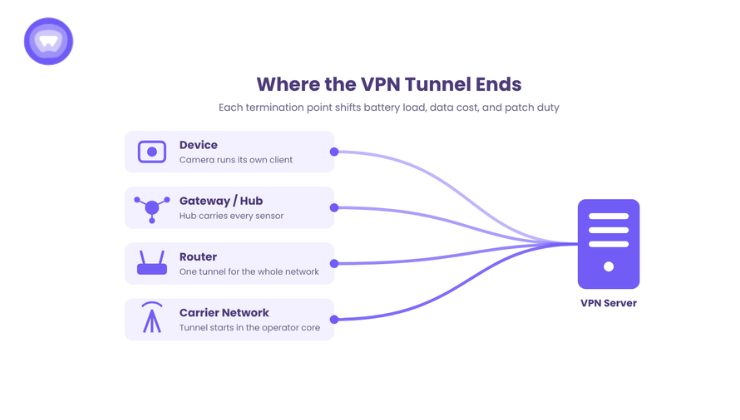
The first architecture choice is where the encrypted tunnel starts and ends. Each option moves cost and control to a different part of the system.
On the Device Itself
The device runs its own VPN client and holds its own keys. Traffic stays encrypted from the device all the way to the VPN server. This gives the strongest end-to-end path. However, it puts encryption work, key storage, and patching on the device processor. It suits capable hardware such as cameras, set-top boxes, and industrial controllers.
On a Gateway or Hub
Small sensors talk to a local hub over Bluetooth, Zigbee, or Wi-Fi. The hub runs the VPN client and carries traffic for every sensor behind it. As a result, the sensors stay simple and cheap. The tunnel does not cover the short hop between sensor and hub, so that link needs its own encryption.
On the Router
The router terminates one tunnel for every device on the network. Smart TVs, consoles, and appliances gain coverage without running any VPN software. In addition, encryption load moves off battery-powered devices entirely. This model suits router makers and mesh Wi-Fi brands selling into homes and small offices.
Inside the Carrier Network
Cellular modules can route traffic through a private network inside the mobile operator. The tunnel then starts at the operator core rather than the device. Therefore, the device spends no battery or bytes on tunnel overhead. The trade-off is dependence on one connectivity provider and less control over exit locations.
| Termination Point | Coverage | Device CPU and Battery Load | Who Patches the VPN Layer | Best Fit |
| Device | One device | Highest | Device maker, through firmware updates | Cameras, set-top boxes, controllers |
| Gateway or hub | Every sensor behind the hub | Low on sensors, moderate on hub | Device maker, hub firmware only | Smart home kits, building sensors |
| Router | Every device on the network | None on end devices | Router maker and VPN provider | Routers, mesh Wi-Fi, hotspots |
| Carrier network | Every SIM on the plan | None | Connectivity provider | Fleet trackers, remote meters |
Most fleets end up combining two of these points. For example, a camera may run its own client while also sitting behind a protected router.
Choosing a Protocol for Constrained Hardware
Protocol choice matters more on a device with limited memory than on a phone. It also sets the data and battery budget of a VPN for IoT devices. Three protocols cover most commercial deployments today.
WireGuard runs over UDP and supports one fixed cipher suite. Its small codebase is easier to audit and patch on embedded Linux. It also needs only a short two-message handshake. For these reasons, it is the default choice for most device classes.
OpenVPN offers broad compatibility and runs over UDP or TCP. It relies on a full encryption library, which adds memory and processor load. In TCP mode, it can stall on lossy cellular links when both layers retry lost packets.
IKEv2 handles network changes well, which helps devices that move between Wi-Fi and cellular. It suits mobile assets such as vehicles and handheld scanners.
Patch ownership and regional blocking also shape this decision. A deeper look at protocol trade-offs covers both from a partner view.
The Bandwidth Math Most Spec Sheets Skip
Bandwidth is where a VPN for IoT devices surprises finance teams. Three separate sources of overhead add up across a fleet.
Per-Packet Header Overhead
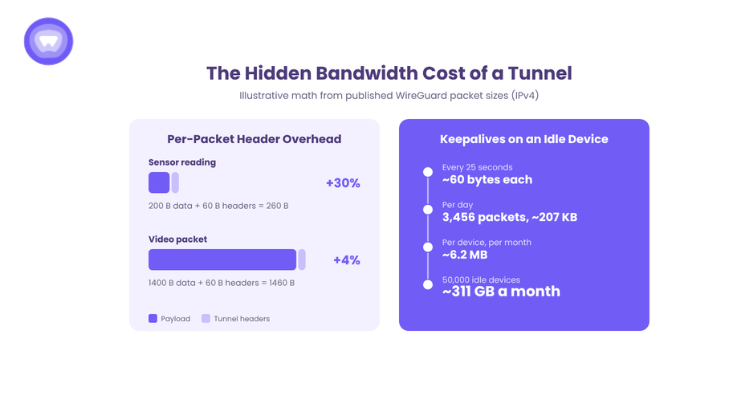
Each WireGuard packet over IPv4 carries 60 bytes of outer headers. Over IPv6, that figure rises to 80 bytes. Large packets barely notice the difference. Small packets do. A 200-byte sensor reading becomes 260 bytes on the wire, a 30 percent increase. By contrast, a 1,400-byte video packet grows by about 4 percent.
Keepalives on a Metered Plan
Devices behind carrier NAT need regular traffic to keep their return path open. A common setting sends a keepalive packet every 25 seconds, at about 60 bytes each. WireGuard only sends one after the link has been quiet for that interval. A fully idle device therefore sends up to 3,456 keepalives a day, or about 207 KB. Over 30 days, that device spends about 6.2 MB on keepalives alone.
Now scale that up. Across an illustrative fleet of 50,000 idle devices, keepalives reach about 311 GB a month. None of those bytes carry a single reading.
Rekeying adds more traffic on busy devices. WireGuard starts a fresh key exchange after 120 seconds of active use. Each exchange uses 240 bytes of handshake messages, or about 296 bytes with IPv4 headers. A device that transmits nonstop can add about 213 KB a day this way.
These figures are illustrative math built on published packet sizes. They are not measured fleet data, so test your own traffic profile before setting plan sizes.
MTU and Fragmentation
The tunnel also shrinks the space left for each inner packet. A 1,420-byte interface MTU suits most links that carry 1,500 bytes. Some cellular paths carry less. When a tunneled packet exceeds the path limit, it gets fragmented or dropped, often with no clear error. Device makers should test MTU on every carrier and module they ship with, not only on office Wi-Fi.
Battery, Sleep Modes, and the Always-On Problem
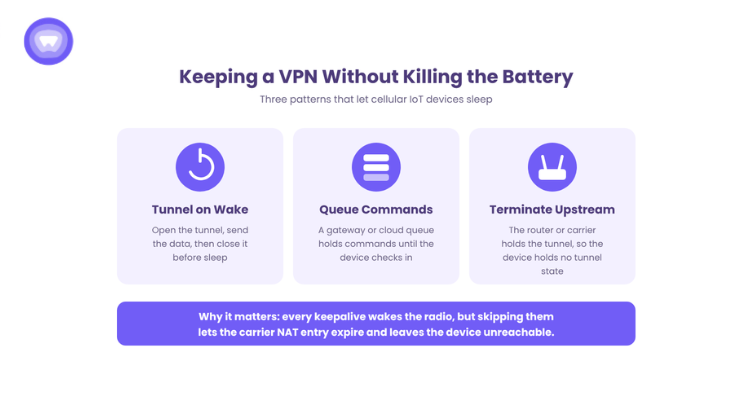
Cellular IoT modules save power by sleeping. In power saving mode, an LTE-M or NB-IoT device goes fully dormant. It stays unreachable until its next scheduled check-in. That deep sleep is what makes a ten-year battery target possible.
A VPN for IoT devices works against that design when it relies on keepalives. Every keepalive wakes the radio. Skipping keepalives carries its own cost, though. Once the carrier NAT entry times out, the device stays unreachable until it sends traffic again.
Three patterns resolve this conflict:
- Bring the tunnel up on wake, send the data, and close it before sleep.
- Route inbound commands through a gateway or cloud queue instead of reaching the device directly.
- Terminate the tunnel upstream at the router or carrier, so the sleeping device holds no tunnel state.
Battery-powered sensors usually fit the second or third pattern. Mains-powered devices can afford an always-on tunnel.
Provisioning Credentials at the Factory
Every device in a fleet needs its own identity. A shared key across a product line becomes a single point of failure. The steps below keep each unit separate:
- Generate a unique key pair per device during manufacturing or at first boot.
- Store the private key in a secure element or protected flash, never in a readable config file.
- Create the VPN account through an API call at activation, following the standard account creation flow.
- Revoke credentials automatically when a unit is returned, resold, or reported stolen.
Revocation is the step teams skip most often. A returned unit with live credentials stays an open door into the VPN service.
Updates, Patching, and the CRA Clock
A VPN client is now a regulated component inside the product. When a VPN library flaw is actively exploited, the 24-hour clock applies to the device maker. It does not stop with the library author. Meanwhile, attackers keep targeting VPN weaknesses at the network edge.
Four habits keep that clock manageable:
- Ship signed over-the-air updates and verify the signature on the device.
- Isolate the VPN layer so it can be patched without a full firmware release.
- Assign who detects, fixes, and reports each flaw before launch, across the whole supply chain.
- Keep a software bill of materials that lists the VPN client version on every product.
Proof: What Moving the Tunnel to the Router Did for One Device Maker
A router maker wanted VPN coverage for smart TVs, consoles, and other devices that cannot run a VPN app. Instead of shipping an app, it embedded VPN support in router firmware through provider APIs. Every device on the network gained coverage automatically, with up to 15 connected at once. End devices also spent no battery on encryption.
The case study puts an in-house build at about a year, plus ongoing maintenance. After launch, the router maker moved from one-time hardware sales to recurring subscription revenue. The published router case study reports 9x growth in average revenue per user. It also reports over 110,000 monthly active users. These are the partner’s self-reported results, not independently audited figures.
A Pre-Launch Checklist for Device Makers
Before choosing a partner for a VPN for IoT devices, confirm these answers in writing:
- Where the tunnel terminates for each product in the line.
- Measured bytes per device per month, including keepalives and rekeying.
- MTU test results on every carrier and module.
- The sleep strategy for battery-powered units.
- Per-device key storage and automatic revocation.
- The patch window and CRA reporting owner for the VPN layer.
Commercial terms deserve the same scrutiny. A set of vetting questions covers margin, SLA, and exit terms before signing.
How PureWL Helps Device Makers
PureWL gives device makers a white label VPN layer to ship under their own brand. It treats a VPN for IoT devices as firmware infrastructure, not a separate app. Its VPN APIs support firmware and hardware integrations. SDKs also cover iOS, Android, Windows, and macOS companion apps. Partners get access to WireGuard, OpenVPN, and IKEv2.
The VPN infrastructure, protocol patching, and server network stay managed on the PureWL side. Device makers keep the customer relationship, the billing, and the brand. The hardware integration program covers routers, industrial machinery, and connected home products.
Conclusion
Building a VPN for IoT devices starts with where the tunnel ends, not which app icon it wears. The termination point sets the battery cost. Protocol and keepalive settings set the data cost. Factory provisioning and patch ownership set the exposure under the Cyber Resilience Act. Device makers who model these numbers before launch ship fleets that stay connected and cheap to run. Those who skip the math find it later, on the carrier invoice.
Request a 20-minute firmware integration walkthrough for your device line.
Frequently Asked Questions
Do you need a VPN for IoT devices?
Yes. Forescout’s 2026 report ranks routers as the riskiest connected device type.
Which VPN protocol works best for IoT devices?
WireGuard suits most device classes because it uses one fixed cipher suite and a short handshake.
How much data does a VPN for IoT devices use?
A 25-second keepalive uses up to 6.2 MB per idle device each month over IPv4.
Does a VPN drain IoT device batteries?
Yes. Each keepalive wakes the cellular radio, so battery units should open the tunnel only on wake.
Should the VPN run on the device or the router?
The router is the better choice for battery devices and devices that cannot host a VPN client.