

- Feature Lists Are Marketing, Not Proof: Encryption, kill switch, and split tunneling on a sales page are claims until a buyer confirms the actual protocol version, patch cadence, and audit scope behind them.
- No-Logs Badges Need a Scope Check: Ask which firm audited the policy, when, and whether the review actually covered the white label build, not just the parent retail brand.
- Shared Infrastructure Creates Shared Risk: Tenants on the same exit IP pool can inherit a blocklist caused by another partner’s abusive user, showing up as unexplained streaming failures.
- Capacity and Pricing Hide Real Limits: Server counts and per-seat rates look strong on a homepage but say nothing about per-tenant bandwidth caps or how per-device pricing multiplies cost across a client’s devices.
- Verification Belongs in the Contract, Not the Sales Call: Protocol versions, audit coverage, and SLA response times only protect a partner when they are written into the agreement before launch.
Every buyer’s guide to white label VPN features lists the same six items. Encryption, kill switch, split tunneling, multi-platform apps, branding, and support. None of them explain how a buyer confirms a provider actually has any of it before a contract gets signed.
That gap matters more than it looks. Marketing pages describe white label VPN features. Contracts confirm them. A feature listed on a sales page is a claim. A feature that survives real traffic, a real audit, and a real support ticket is a capability. Buyers who cannot tell the difference end up reselling something they cannot defend to clients later.
This matters most for MSPs and MSSPs adding a VPN line to an existing security stack. The margin only holds if white label VPN features perform the way the pitch deck said they would.
The Feature List Every Guide Repeats
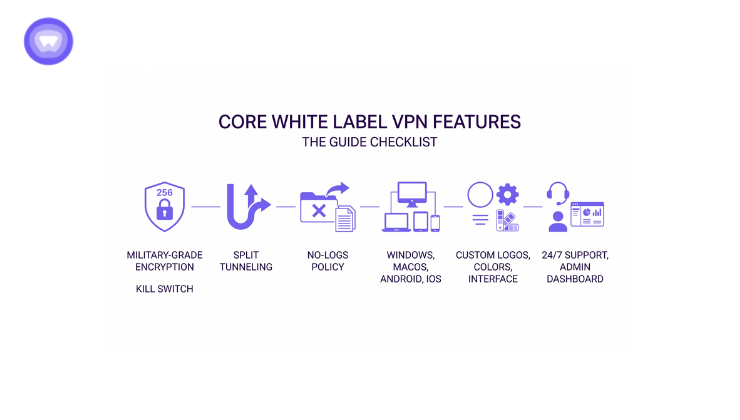
Search for white label VPN features and the same checklist appears across dozens of pages:
- Military-grade encryption and a kill switch
- Split tunneling and a no-logs policy
- Cross-platform apps for Windows, macOS, Android, and iOS
- A branded interface with custom logos and colors
- 24/7 support and an admin dashboard
None of this is wrong. It is simply the label on the box, not the contents. A provider can print all five items on one page. No page confirms the version or the actual limit behind each line.
What Verifying a White Label VPN Feature Actually Means
Third-party involvement in breaches doubled to 30 percent last year. That is according to a 2026 analysis of Verizon’s Data Breach Investigations Report. For an MSP, that number includes every vendor sitting inside a client stack. VPN platforms included.
The same analysis puts the average United States data breach at 10.22 million dollars. That figure is not abstract for a reseller. If a platform fails a client, the MSP that recommended it inherits part of the liability conversation.
Consider an illustrative example. An MSP with 40 clients resells a VPN platform at 8 dollars per seat, across 25 seats each. That is 8,000 dollars in monthly recurring revenue. If the platform’s real bandwidth cap forces a mid-contract downgrade for 10 clients, someone absorbs the cost. That someone is the MSP, through support escalations and client credits, not the vendor. A feature gap discovered after signing costs far more than the same gap caught during evaluation.
Verifying white label VPN features means asking three questions before signing:
- What version of the feature is deployed right now
- What scope has anyone independently confirmed
- What happens operationally if the feature fails in production
Those three questions apply differently across the standard checklist. The next sections walk through how.
Encryption and Protocol Support Need a Version Number
“Supports OpenVPN” is not a specification. It is a marketing sentence. The real question is which build sits inside the app, and how old it is.
How to Confirm the Implementation Is Current
A recent analysis checked Windows VPN apps for outdated code. More than half still ran OpenVPN untouched for over a year. The protocol name stayed the same on every marketing page. The security behind it did not.
Ask a provider for the exact protocol library version. Ask for the patch cadence too, not just the protocol name. A provider that cannot answer quickly is telling a buyer something important.
Protocol names hide real technical differences buyers rarely ask about. WireGuard uses the Noise protocol framework for its handshake. It relies on ChaCha20 for encryption and Curve25519 for key exchange, which keeps connections fast on mobile networks. OpenVPN can run AES-256-GCM or ChaCha20-Poly1305, depending on configuration.
Two providers both listing “OpenVPN support” may ship entirely different cipher suites. IKEv2/IPsec pairs almost universally with AES-256. It also handles network switching, from Wi-Fi to cellular, better than the alternatives. That matters for mobile-heavy client bases. A buyer should ask which protocol is the default for new connections. The features list alone will not answer that.
Testing Kill Switch and Leak Protection Directly
A kill switch listed on a features page is a design intent, not a confirmed behavior. Buyers rarely test it before signing, and vendors rarely offer to prove it.
The test itself is simple. Connect to the VPN, then start a continuous ping to an external server. Force the VPN interface down at the operating system level, instead of closing the app normally. A working kill switch blocks all traffic within a second or two. A weak implementation lets several packets leak through first. That gap is enough to expose a client’s real IP during a routine network hiccup.
DNS leak protection deserves the same scrutiny. Many VPN apps block IPv4 DNS leaks by default. Fewer block IPv6 DNS queries, since IPv6 support arrived later across the industry. A quick DNS leak test with IPv6 enabled reveals this gap immediately. It is a gap most sales demos never surface, since demo devices are usually configured with IPv6 disabled.
Buyers evaluating white label VPN features should request a working sandbox account. Run both tests before signing, not after onboarding the first client.
How Multi-Tenant Architecture Actually Isolates partners
Most white label VPN providers run one shared server fleet underneath every partner’s branded app. How that fleet separates tenants determines whether one partner’s problem becomes every reseller’s problem.
Two architectures are common:
- Shared exit IP pools, where multiple partners’ traffic exits through the same server IP addresses
- Per-tenant IP allocation, where each partner gets a distinct IP range tied only to their branded traffic
Shared exit IP pools create a specific, underdiscussed risk: IP reputation bleed. One partner’s end user can abuse a shared exit IP for spam or scraping. Streaming services and websites then blocklist that IP entirely. Every other partner sharing it inherits the block, through no fault of their own clients. This shows up as sudden streaming failures or CAPTCHA walls. A partner’s own support team cannot explain it, since the cause sits entirely on the provider’s side.
Buyers should ask a direct question before signing. Does this provider isolate tenant traffic at the IP level, or only at the branding and billing level. The two are not the same thing. Only one of them protects a partner from another tenant’s bad actors.
Server Jurisdiction Is a Feature, Not Just a Location
A server map showing 88 countries answers where traffic can exit. It does not answer which laws govern the backend infrastructure processing that traffic in the first place.
Provider incorporation location decides which legal frameworks apply to account data, billing records, and any metadata a platform retains. A provider based in a jurisdiction with mandatory data retention laws operates under different constraints than one without them. This holds true regardless of what the no-logs policy claims on paper.
For resellers serving clients under GDPR, CCPA, or similar regimes, this detail affects the reseller’s own compliance posture. It is not only the provider’s concern. Ask where the parent company is legally domiciled, not only where servers physically sit.
No-Logs Claims Need an Audit Scope, Not Just a Badge
A no-logs badge on a landing page means little on its own. Independent VPN audits typically examine a sample of server configurations across a fixed time window. They rarely extend to support systems or website data.
Questions to Ask About Audit Coverage
- Which firm performed the audit, and when
- Did the audit cover the white label backend, or only the parent retail brand
- Does the scope include support tickets, or only server logs
That second question matters specifically for reseller buyers. A retail VPN brand’s audit does not automatically extend to every branded build running on the same backend. A buyer needs written confirmation the scope covers the environment their own users will run.
Capacity Limits That Do Not Show Up on a Sales Page
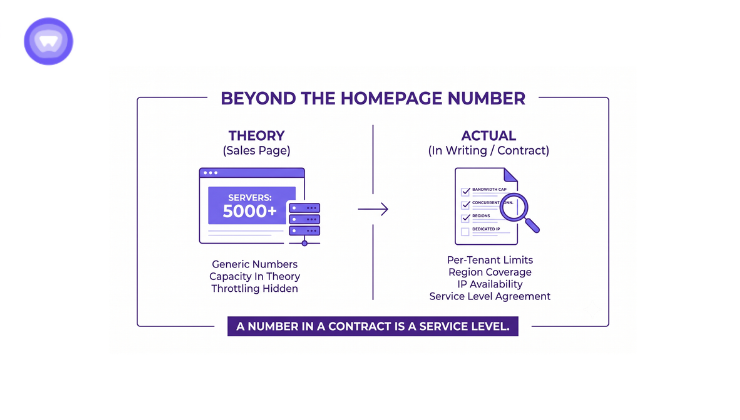
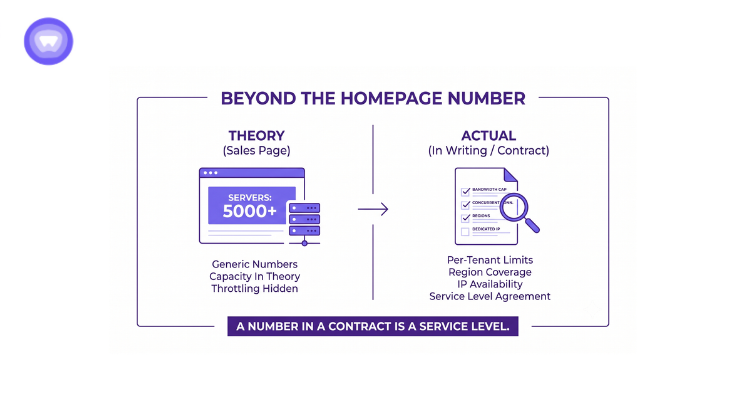
Server count on a sales page describes capacity in theory, not capacity under a reseller’s actual load. A provider running thousands of servers can still throttle bandwidth per tenant. It can also cap connections or reserve dedicated IPs for higher tiers.
Buyers should request the following in writing before signing:
- Per-tenant bandwidth and concurrent-connection limits
- Dedicated IP availability, and any added cost attached to it
- Server region coverage relevant to the buyer’s own client base
A number on a homepage is not a service level. A number in a contract is.
Admin Dashboard Depth vs Branding-Only Customization
Two providers can both advertise a white label dashboard and mean very different things. Some platforms allow logo and color changes only, on top of a fixed feature set. Others expose a real API and SDK layer.
The difference shows up months after launch, not on day one. A branding-only platform forces every feature request through the vendor’s own release schedule. A platform with real API depth lets a reseller build around client needs directly.
Ask for API documentation before signing, not after. If a provider cannot produce it on request, treat the listed features as cosmetic. The dashboard page is not proof. A working sandbox account, even a limited one, settles the question faster than any sales call.
Pricing Structure Hides Inside the Feature List Too
Per-seat pricing and per-device pricing look similar on a rate card. They behave very differently once a reseller’s client base grows past a single device per user.
A household or small office client often runs a VPN across a phone, a laptop, and a tablet at once. Per-device pricing on white label VPN features can quietly triple the effective cost per client compared with per-seat terms.
Buyers should ask for both pricing models in writing, along with the exact device count each plan tier allows. A rate card without that detail is not a complete quote. It is a starting number.
This is why white label VPN features need a written specification. A sales conversation is not enough before a partner agreement gets finalized.
SLA and Support Terms Reveal Operational Maturity
A support page listing “24/7 support” says nothing about response time or escalation path. It says even less about what happens during an outage affecting a reseller’s own paying clients. This is where feature marketing and operational reality diverge most.
Ask a provider what happens at 2 a.m. during a regional outage. Ask who the reseller calls, and what the guaranteed acknowledgment window is. A verbal answer is not a service level. A number written into the contract is.
| Feature Claim | What It Usually Means on a Sales Page | What to Verify Before Signing |
| Military-grade encryption | AES-256 mentioned once, no version detail | Exact cipher suite and library version, with patch date |
| No-logs policy | Badge or audit mention, no scope stated | Which firm audited, what scope, whether the white label build is covered |
| 24/7 support | Ticket system available around the clock | Guaranteed first-response time written into the contract |
| Multi-platform apps | Windows, macOS, Android, iOS listed | Whether smart TV, router, and browser extension coverage is included or extra |
| Scalable infrastructure | Server count and country total | Per-tenant bandwidth cap and dedicated IP cost in writing |
| Admin dashboard | Screenshot of a branded panel | API and SDK access depth, not just cosmetic controls |
Buyers who negotiate against the middle column instead of the right one discover the gap after launch. By then, a client is already depending on the service.
A documented case in this exact category involved an MSP pairing antivirus with a white label VPN suite. The outcome included a 20 percent gain in enterprise clientele and a 32 percent cut in operational costs. Client retention rose 15 percent, with 25 percent revenue growth within two months. That outcome depended on the platform holding up once real clients arrived, not on the feature list at signing.
How PureWL Helps
PureWL White Label VPN Solution exists for exactly this stage of the decision. The platform documents protocol versions, audit scope, and per-tenant limits in writing before a partner signs. Verification, not persuasion, is the point.
Partners get a KPMG-verified no-logs policy and over 6,500 servers across 88 countries. More than 150 active partners are already running white label VPN features in production today. Each of those figures is documented at the level buyers need for due diligence, not a marketing summary. That distinction is the entire reason a verification-first evaluation process exists.
Final Thoughts
White label VPN features only matter once a buyer can verify them against a contract, not a comparison page. The checklist stays the same across every guide written on the topic. What separates providers is what each one puts in writing before a client goes live. Request the version numbers, the audit scope, and the per-tenant limits directly, and let the answers decide the shortlist.