

Quick answer: A telehealth VPN protects the network path around a visit, not the visit itself. The video stream already travels encrypted. The tunnel hides patient and clinician IP addresses, secures untrusted Wi-Fi, and keeps video routing under the platform’s control.
Key Takeaways
- A telehealth VPN protects the network path around a visit, since the video stream already travels encrypted.
- HHS lists IP addresses among the 18 safe harbor identifiers, so hiding them protects patient identity.
- Split tunnels can expose a patient’s real address through video path discovery unless the app restricts it.
- Clinician and patient apps need separate tunnel policies for blocking, reconnects, and access removal.
- HHS projects the Security Rule update for July 2027, while the current rule stays fully enforced.
A leaked or dropped telehealth visit costs more than one appointment. IBM’s 2025 Cost of a Data Breach report found healthcare is the costliest industry for breaches. The average healthcare breach cost $7.42 million. Those breaches also took 279 days to identify and contain, the longest of any sector.
Patients now treat video care as normal. In a 2024 PAN Foundation poll, 44% of adults used telehealth in the past year. Among them, 69% had both audio and video at their latest visit. Every one of those visits ran over a network the platform never chose.
That gap is where a telehealth VPN fits. This guide covers what the tunnel protects and how it interacts with video routing. It also covers what to settle with a VPN vendor before launch. It is written for telehealth product teams building patient and clinician apps.
What a Telehealth VPN Protects and What It Does Not
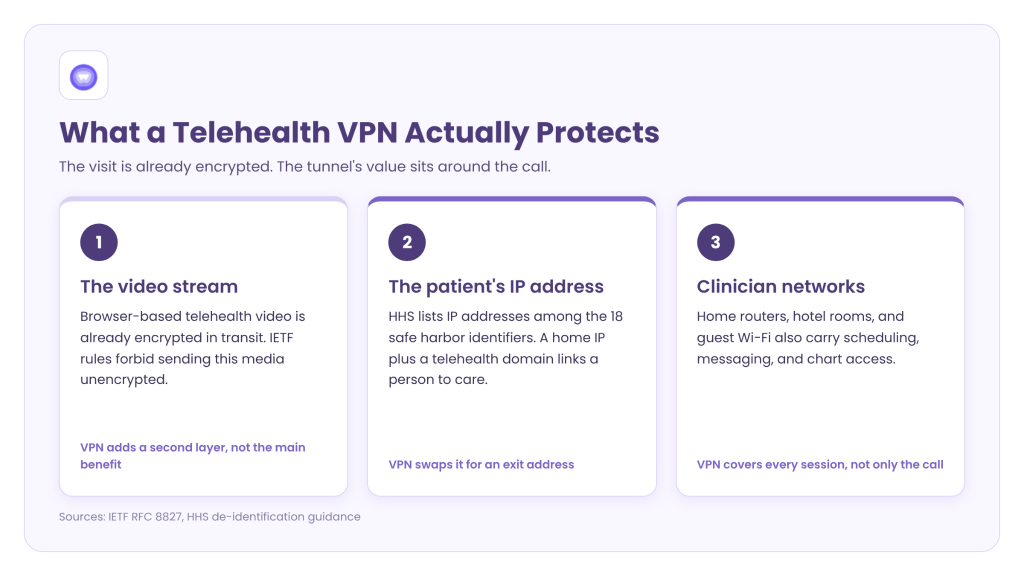
Teams often pitch the tunnel as the thing that makes a visit secure. That framing overstates it. The real value sits in three places around the call.
The Visit Is Already Encrypted
Browser-based telehealth video already encrypts audio and video in transit. The IETF security architecture for that video standard forbids sending media unencrypted. A VPN adds a second layer on top of that. However, the second layer is not the main benefit. Selling the tunnel as the only encryption that matters overstates what it does.
The IP Address Is a Patient Identifier
HHS lists IP addresses among the 18 identifiers removed for safe harbor de-identification. A home IP address paired with a telehealth domain links a person to a care relationship. Every party that sees that pairing holds identifying data. That includes the hotel network, the internet provider, and any third-party endpoint the app calls.
A telehealth VPN breaks that pairing. The local network sees only an encrypted tunnel. Outside services see the exit address instead of the home address.
Untrusted Networks on the Clinician Side
Clinicians open charts from home routers, hotel rooms, and hospital guest Wi-Fi. The video call stays protected. Still, the same device also reaches scheduling, messaging, and the clinical record system. Each of those connections inherits whatever the local network allows. A device-level tunnel closes that gap for every session the clinician app starts.
How a Telehealth VPN Interacts With Video Routing
Video is where most VPN integrations go wrong. The routing choice decides both privacy and call quality. Unfortunately, the two goals pull in opposite directions.
The Split Tunnel Leak
Browser-based telehealth video typically runs on an open real-time standard that discovers every network path a device has. IETF guidance warns about this behavior with split tunnels. The discovery process can reveal the internet provider address underneath the tunnel. As a result, excluding video to save delay can hand a patient’s home address to the other side.
The fix is a configuration choice, not a new product. The video stack should gather addresses from the default route only. The IETF document defines this as a separate mode, and native apps can enforce it.
The Latency Budget
Forcing video through a slow relay creates the opposite problem. ITU-T Recommendation G.114 cites one-way delay under 150 milliseconds as the level where most applications are not significantly affected. Every extra network hop spends part of that budget. Audio processing then adds its own delay on both ends.
The same IETF guidance also flags a transport problem. Pushing live media through proxies over ordered, connection-based transport degrades media quality. Two rules keep a telehealth VPN inside the budget:
- Route video through a tunnel that uses the fast, connectionless transport live media prefers.
- Assign the exit server nearest both parties, not nearest the platform’s headquarters.
Consider an illustrative platform running 10,000 video visits a month. Suppose a badly routed tunnel pushes 2% of calls past the delay budget. That means 200 patients a month get a broken visit. Each one becomes a support ticket, a rebooking, or a lost patient.
Mobile patients also switch from Wi-Fi to cellular during a visit. The protocol mix a vendor supports decides whether the tunnel survives that handoff. A tunnel that drops on handoff takes the call down with it.
Leaks Outside the Video Stream
Name lookups and the newer internet address format matter as much as video routing. A tunnel built for only one address format can push lookups onto the other. That address fallback sends queries outside the tunnel entirely. Those queries reveal which services the device contacts. Test both leak paths before any release that touches the network layer.
Telehealth VPN Routing Options Compared
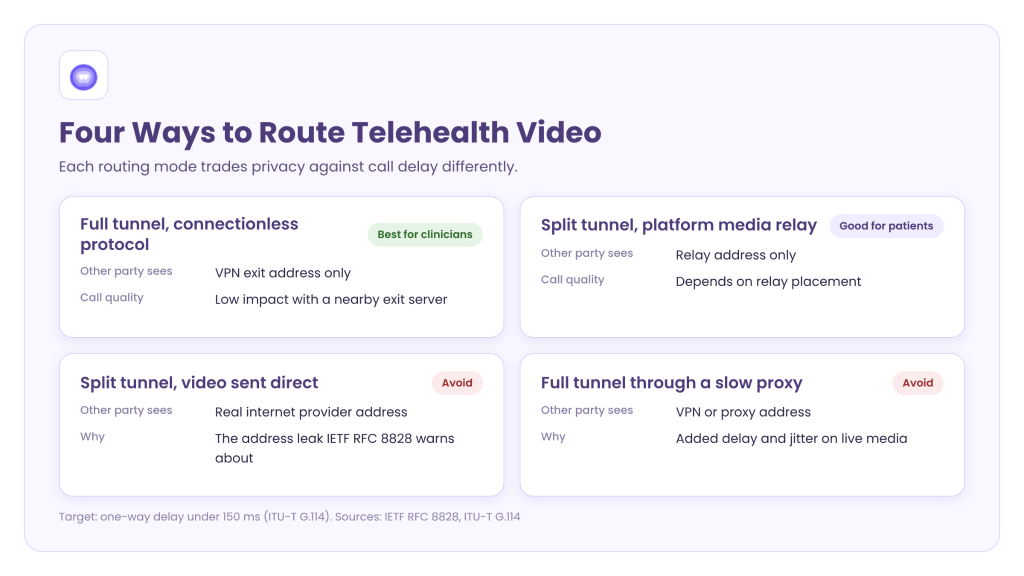
Each routing mode trades privacy against delay in a different way. The table below maps the four common setups against what the other party sees and how calls perform.
| Routing Mode | What the Other Party Sees | Call Quality Impact | Best Fit |
| Full tunnel over a connectionless protocol (WireGuard over UDP) | VPN exit address only | Low when the exit server sits near both parties | Clinician apps handling charts and video |
| Split tunnel, video sent through the platform’s own media relay (TURN) | Relay address only | Depends on relay placement | Patient apps on weak home connections |
| Split tunnel, video sent direct with full WebRTC candidate gathering | Real internet provider address | None from the tunnel | Avoid: this is the leak RFC 8828 describes |
| Full tunnel through a proxy over TCP | VPN or proxy address | High: added delay and jitter on media | Avoid for live visits |
Two Users, Two Tunnel Policies
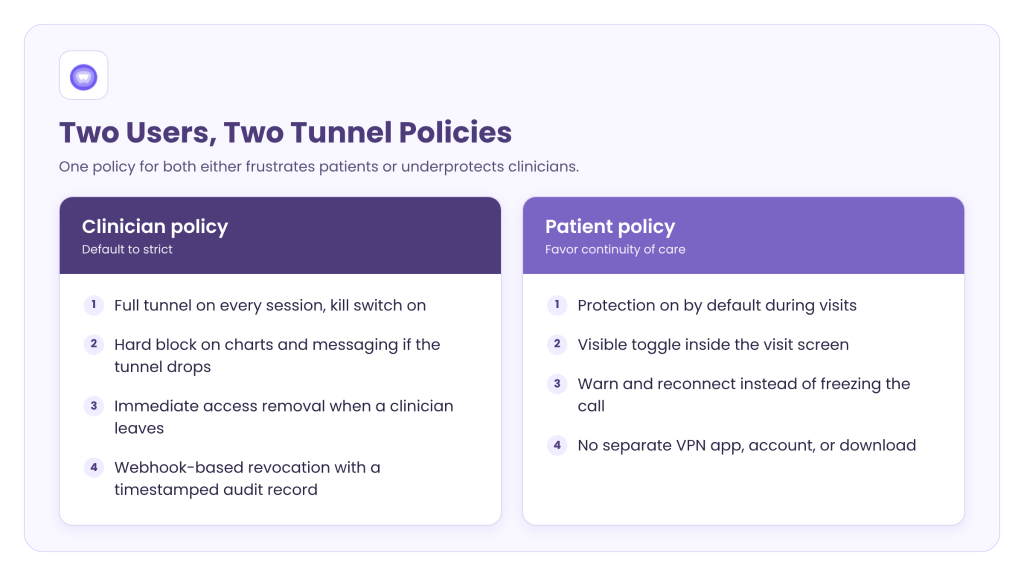
A telehealth app serves two users with different risk profiles. One VPN policy for both either frustrates patients or underprotects clinicians. Splitting the policy by role solves both problems.
Clinician Policy
Clinicians touch the most sensitive records, so their policy should default to strict. The core settings are simple:
- Full tunnel on every session, with the kill switch on.
- Hard block on chart access and messaging whenever the tunnel drops.
- Immediate access removal when a clinician leaves the practice.
That last item depends on revocation speed. A polling check every few minutes leaves a departed clinician connected for that window. Webhook-based revocation removes access when the event fires. It also leaves a timestamped record for the auditor.
Patient Policy
Patients need protection that never gets in the way of care. Their policy should favor continuity over strict blocking:
- Protection on by default during visits, with a visible toggle.
- Softer failure that warns and reconnects instead of freezing the call.
- No separate VPN app, account, or download.
Keeping the tunnel inside the visit screen means it runs without a second sign-in.
Compliance Questions to Settle Before Launch
A telehealth VPN does not make an app HIPAA compliant on its own. It does create a vendor relationship that compliance reviewers will examine. Three questions deserve written answers before any contract closes.
Business Associate Status
HHS limits the conduit exception to transmission-only services with transient access to health data. HHS also states that a cloud provider storing encrypted health data is a business associate, even without the key. So the agreement question depends on what the VPN vendor stores and for how long. Counsel should decide with the vendor’s logging documents in hand, not its marketing page.
Logging Scope
Connection logs can hold timestamps, assigned addresses, and session mappings. In a telehealth context, those records can tie a patient’s address to a visit time. A no-log claim needs a stated audit scope that names the server pool and testing window. Use these vetting questions to confirm the audit covered the white label build, not only a retail app.
Bundled Code in the Software Kit
Health apps face extra risk from third-party modules. Check any VPN software kit for bundled advertising or analytics modules before integration. One analytics call from a visit screen can expose the identifiers the tunnel was meant to hide. A side-by-side review of VPN SDK providers treats this as a standard supply-chain check before signing.
A Pre-Release Test Plan for Telehealth VPN Integration
Vendor documents describe intended behavior. Only testing on real devices shows what patients and clinicians will experience. Run these checks on every release that changes the network layer:
- Address check: Join a test visit and record which address the far side’s video stack receives.
- Drop test: Kill the tunnel mid-call and time how long the app takes to block or reconnect.
- Handoff test: Walk a phone from Wi-Fi to cellular during a live visit and confirm the call holds.
- Delay check: Measure one-way delay between test devices in different regions against the 150 millisecond budget.
- Leak check: Watch name lookups on both address formats and confirm nothing leaves outside the tunnel.
- Revocation check: Deactivate a test clinician account and time how fast the tunnel closes.
- Traffic audit: Log every outbound call the software kit makes and flag any analytics or advertising endpoint.
Record the results with dates and build numbers. Together, those records become the evidence a compliance reviewer asks for when the network map comes up.
Why Telehealth Product Teams Should Decide Now
The regulatory direction is already public. The proposed Security Rule update from HHS would require encryption of health data in transit. It would also require network segmentation and a network map showing how health data moves. Business associates would need to verify their technical safeguards at least once every 12 months.
HHS now projects final action for July 2027, according to the federal regulatory agenda. Meanwhile, the current Security Rule stays fully enforced. The pandemic-era flexibility is also gone, since the OCR telehealth transition period ended in August 2023.
A network map that shows patient traffic leaving through an unmanaged path invites an audit finding. The routing decision belongs in the next roadmap, not the month a final rule publishes.
Proof: A Built-In VPN in a Communication App
A mobile developer building communication, fintech, and productivity apps faced the same network problem. Its users connected from public Wi-Fi, and third-party VPN apps added friction. The developer embedded white-label VPN software kits across Android, iOS, macOS, and Windows.
The build included split tunneling, a kill switch, and failover servers behind one “Secure Mode” toggle. After the update, 40% of users enabled the VPN within their first session. Also, 99% of user traffic ran through secure tunnels, per the published communication app case study. These are the client’s results as reported in a vendor case study, not independently audited figures. The client is not a healthcare company, but its delivery model matches a patient-facing telehealth app.
How PureWL Helps
PureWL delivers white-label VPN software kits for Android, iOS, macOS, and Windows. Split tunneling and a kill switch come built in. Its network runs under a KPMG-certified no-log policy. It also supports several tunneling protocols, so clinician and patient apps can run different policies.
PureWL’s industry guidance already covers healthcare providers building telemedicine applications on its software kits. During scoping, request the logging scope documentation and discuss business associate terms directly.
Conclusion
A telehealth VPN earns its place by closing the gaps around a visit. It hides the IP address that HHS treats as an identifier. It also secures clinician devices on untrusted networks and keeps video inside a measured delay budget. The hard decisions sit in routing, role-based policy, and vendor logging scope. Settle those three before the next release, not after a reviewer asks for the network map.
Request a 20-minute telehealth VPN integration walkthrough with a PureWL partner engineer.
Frequently Asked Questions
Is a VPN required for HIPAA-compliant telehealth?
HIPAA names no product, but it requires transmission security, and a VPN protects the paths around a visit.
Does a telehealth VPN replace video encryption?
No, it protects IP addresses, untrusted Wi-Fi, and non-video traffic around an already encrypted video stream.
Does a VPN vendor need to sign a business associate agreement?
It depends on storage, because HHS limits the conduit exception to transmission-only services with transient access.
Will a telehealth VPN slow down video visits?
Not when video uses a connectionless tunnel and an exit server near both the patient and clinician.
Is an IP address protected health information?
HHS lists IP addresses among the 18 identifiers removed for safe harbor de-identification of health data.