

Quick answer: Native VPN APIs such as Android VpnService and iOS NetworkExtension give your app a slot for a tunnel. They do not give you a protocol engine, servers, or leak protection. A VPN SDK fills that same slot with a tested engine and a server network. So the real choice is who fills the slot, not whether you use it.
Key Takeaways
- Android VpnService and iOS NetworkExtension give you a tunnel slot, not a protocol engine, servers, or leak protection.
- A VPN SDK runs inside those same native APIs, so the choice is who builds and maintains the engine.
- OpenVPN libraries carry GPLv2 or AGPLv3 terms, while WireGuard's official libraries use permissive Apache 2.0 and MIT licenses.
- Leak flaws such as TunnelCrack and TunnelVision hit each OS differently, so in-house builds must test every platform.
- iOS caps a packet tunnel extension at about 50 MB of memory, and Windows drivers depend on Microsoft signing.
- Building in-house fits teams that already run servers, need a custom protocol, or ship on one platform.
Every Android and Apple device ships with native VPN APIs. That makes an in-house build look cheap at first. However, the operating system only hands you an empty tunnel interface. Your team still has to supply everything that moves packets safely through it.
The gaps show up fast. In 2023, researchers tested more than 66 VPN apps on five platforms. They found that every iOS VPN they tested leaked traffic under one attack. In addition, a 2026 agency guide puts a custom VPN build at $20k to $180k+. The same guide estimates three to twelve months before launch.
This guide compares a VPN SDK against building directly on native VPN APIs. It covers what each platform actually provides, the costs teams miss, and when an in-house build makes sense.
What Native VPN APIs Actually Give You
Each operating system exposes a different set of native VPN APIs. The scope also varies more than most product teams expect. Here is what each platform provides on its own.
Android VpnService
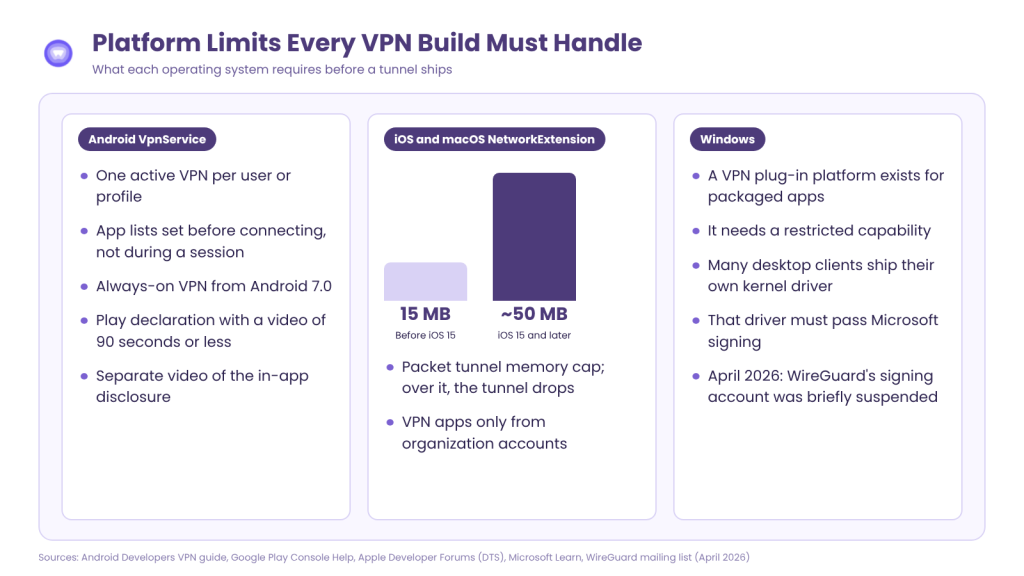
Android VpnService creates a virtual network interface for your app. Your code reads raw packets from it, encrypts them, and sends them to a server. The system shows a consent dialog before your app can become the active VPN.
The Android VPN guide also sets clear rules. Only one VPN can run per user or profile at a time. Your app can keep an allowed list or a disallowed list of apps, but not both. Furthermore, your app must set those lists before connecting, not during a session.
Android also offers always-on VPN from Android 7.0. The person using the device, or an IT admin, can then block all traffic outside the tunnel. Your app does not control that switch, so your interface must handle it.
iOS and macOS NetworkExtension
On Apple platforms, iOS NetworkExtension hosts your tunnel inside a separate app extension. That extension runs apart from your main app and has its own memory budget. Your team writes the code that turns packets into encrypted traffic.
The extension also needs its own target, entitlement, and shared app group. As a result, a VPN feature adds a second binary to every iOS and macOS release.
Windows Splits Into Two Paths
Windows does offer a VPN plug-in platform. However, it is built for packaged apps and needs special approval to use. Many desktop clients take a different route. WireGuard, for example, ships its own kernel network driver. That driver must pass Microsoft signing before it loads on user machines.
The Middle Path: Built-In Protocol Profiles
Between a full SDK and a custom engine sits a lighter option. Both Android and Apple can run their own built-in VPN protocol for you.
On Android, the platform VPN profile arrived in API level 30. With it, the system handles the key exchange and the encryption. Your app just supplies the server address and login. On Apple platforms, the system VPN manager offers a similar built-in option.
This path removes protocol code from your app. However, it locks you into one protocol family. You also lose custom fallback, disguised traffic for strict networks, and newer options such as WireGuard. Most consumer-grade VPN features need more than the built-in profile allows.
What a VPN SDK Adds on Top of Native VPN APIs
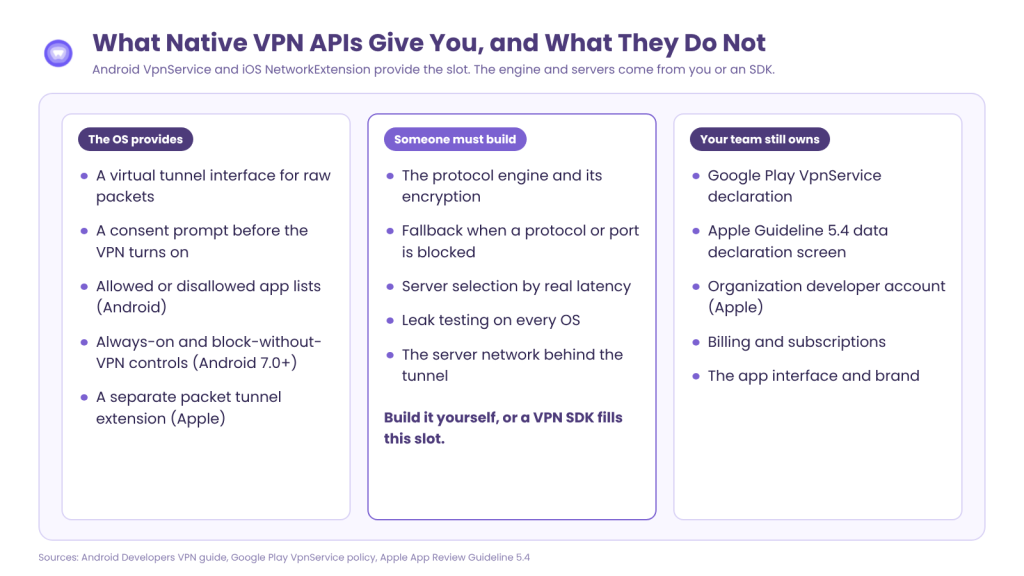
A VPN SDK does not replace native VPN APIs. Instead, it runs inside them. On Android, the SDK still uses Android VpnService. On Apple devices, it still lives in an iOS NetworkExtension target.
What changes is who writes and maintains the code inside the slot. A managed VPN SDK typically adds the following:
- A tested protocol engine with more than one protocol
- Automatic fallback when one protocol or port is blocked
- Server selection based on real latency from the device
- Connection state callbacks for your interface
- A server network that the vendor runs and patches
The SDK handles the tunnel on the device. Meanwhile, the vendor’s account layer manages credentials and server lookups from your backend. Most production apps use both pieces together.
VPN SDK vs Native VPN APIs: Side-by-Side Comparison
The table below compares the three paths across the factors that decide cost and risk.
| Factor | Build on Native VPN APIs | Built-In Protocol Profile | Managed VPN SDK |
|---|---|---|---|
| Protocol engine | Your team writes or licenses one (WireGuard, OpenVPN) | OS-provided (IKEv2/IPsec only) | Vendor-provided (several protocols) |
| Servers | Your team runs them | Your team runs them | Vendor runs them |
| Android layer | VpnService, built by your team | Platform VPN profile (API 30+) | VpnService, built by vendor |
| Apple layer | Packet tunnel extension, built by your team | System VPN manager | Packet tunnel extension, built by vendor |
| Windows | Plug-in platform, or own kernel driver plus Microsoft signing | OS client, limited control | Vendor desktop SDK |
| Protocol fallback | Your team builds it | Not available | Included |
| Leak hardening | Your team tests each OS | OS default behavior | Vendor tests and patches |
| License exposure | Depends on library (GPL, AGPL, MIT, Apache) | None | Commercial terms |
| Store paperwork | Your team files it | Your team files it | Your team files it |
The last row matters. No path removes store paperwork, because the app ships under your developer account.
Five Costs Teams Miss When Building on Native VPN APIs
Native VPN APIs cost nothing to call. The expense sits in everything around them. These five costs rarely appear in an early build estimate.
Protocol Licensing Can Force Source Disclosure
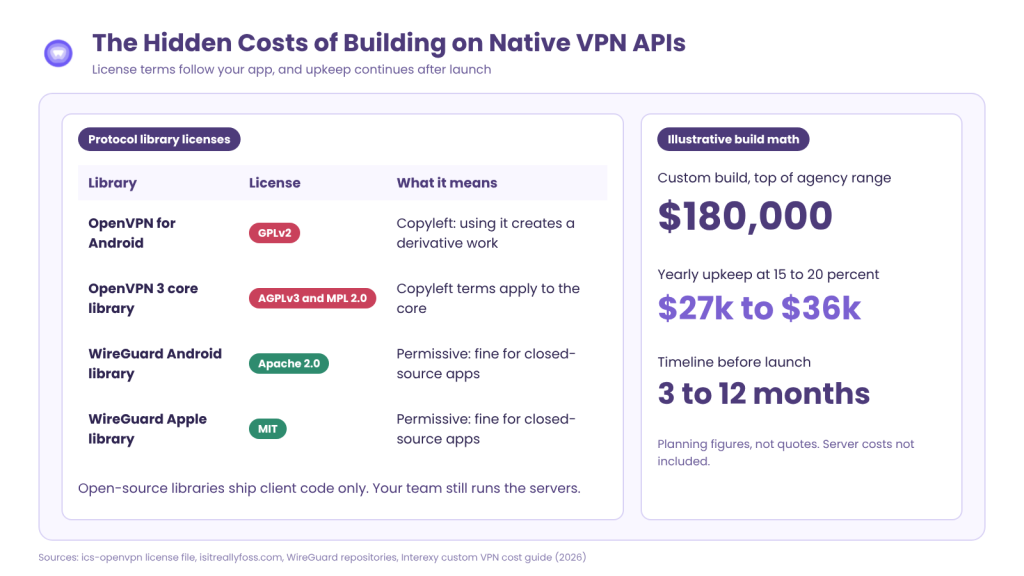
Your tunnel needs a protocol library, and its license follows your app. For example, the OpenVPN for Android library uses GPLv2 terms. Its license states that using any part of it creates a derivative work. Similarly, the core OpenVPN 3 library ships under AGPLv3 and MPL 2.0.
In contrast, WireGuard’s official libraries use permissive licenses. The Android tunnel library uses Apache 2.0, and the Apple library uses MIT. Still, these open-source libraries ship client code only. Your team must run the servers behind them.
Leak Hardening Differs on Every OS
The system does not make a tunnel leak-proof by default. In the 2023 TunnelCrack study, all but one tested macOS client leaked traffic. Android fared best, with roughly one quarter of apps affected. The researchers suggested Android’s VPN interface is more carefully designed.
Then, in 2024, a second flaw called TunnelVision appeared. An attacker on the same local network could reroute VPN traffic outside the tunnel. It affected Windows, Linux, iOS, and macOS. Android was not affected. So a team building on native VPN APIs must test and patch each OS separately.
The iOS Memory Ceiling
Apple caps how much memory a packet tunnel extension can use. On iOS 15 and later, that memory limit sits at about 50 MB. Earlier versions allowed only 15 MB. When the extension crosses the limit, the system terminates it and the tunnel drops.
This matters for teams that add filtering or ad blocking inside the tunnel. Every feature competes for the same small budget. Therefore, the protocol engine must stay lean on every supported device.
Windows Driver Signing Sits Outside Your Control
On Windows, the kernel driver adds a dependency on Microsoft’s signing process. In April 2026, the WireGuard team tried to submit its driver for signing. Microsoft had suspended the project’s account. It was unblocked about a day later, after public discussion. Even so, the episode shows that a release can stall on a process your team does not own.
Store Policy Paperwork
Both app stores treat VPN apps as a special category. On Google Play, every app using VpnService must file a VpnService declaration. The form asks for a short video, 90 seconds or less, showing the VPN in use. A second video must show the in-app prominent disclosure.
Apple sets its own bar under Guideline 5.4. VPN apps may only come from developers enrolled as an organization. The app must also declare what user data it collects on a screen before purchase. Because reviewers check these declarations, VPN apps can sit longer in the review queue.
What These Costs Add Up To
Consider an illustrative example using the agency figures above. A custom build at the top of that range costs $180,000. The same guide puts yearly maintenance at 15 to 20 percent of development cost. That adds $27,000 to $36,000 every year before any server bill. These are planning numbers, not quotes, but they show where the money goes.
When Building on Native VPN APIs Is the Right Call
An in-house build on native VPN APIs makes sense in a few specific cases. The list below covers the strongest ones.
- You already run VPN servers. The server fleet is the largest cost, so owning it changes the math.
- You need a custom protocol. Some products tunnel traffic in a way no vendor engine supports.
- You ship on one platform only. A single Android app avoids Apple memory limits and Windows drivers.
- You only need site access. An internal tool that reaches company servers can use the built-in profile.
Outside these cases, the build path trades months of work for features a VPN SDK already has. Most product teams want a privacy feature, not a network team.
What the Evidence Shows
One case shows how the SDK path works on all four platforms. A mobile app developer serving millions of daily users needed VPN protection inside its own apps. The company builds communication, fintech, and productivity apps. It first looked at in-app encryption, secure proxies, and separate VPN apps. Each fell short. So it chose a white-label SDK built into its own apps.
The SDK ran on each platform’s own layer. On Android, it used VpnService. On iOS and macOS, it used NetworkExtension. On Windows, it used the built-in filtering and network tools. After rollout, 40% of users enabled the VPN within their first session. Average connections ran 22% faster than standalone VPN apps. These figures are self-reported by the vendor and were not independently audited.
How PureWL Fits
PureWL ships native VPN SDKs for Android, iOS, macOS, and Windows, plus a REST API for accounts. The Android SDK supports WireGuard, OpenVPN over UDP and TCP, and IKEv2. It adds split tunneling, reverse split tunneling, protocol fallback, and failover to a nearby server. The Apple SDKs add custom on-demand rules and run inside packet tunnel targets your team creates. On macOS, release builds package the tunnel as a system extension. On Windows, the SDK installs through NuGet, and its installer ships the needed services and drivers.
PureWL runs the server side on a no-log network that it lists as KPMG certified. The API manages accounts and server lookups, while the SDK opens the tunnel on the device. As a result, your team keeps the Android VpnService and iOS NetworkExtension layers without writing the protocol engine. Your team still owns store declarations, billing, and the interface. Pricing is quoted per partner based on scope.
Engineering teams can check each piece in the public docs before any call:
- SDK documentation for all four platforms
- The Android SDK setup, protocols, and connection callbacks
- The macOS SDK system extension setup
- The Windows SDK install and driver steps
- How the APIs connect a user, step by step
- API access authentication with a secret key and token
- VPN account management for renewals, suspensions, and deletion
- Subscribed protocols by device type
Conclusion
Native VPN APIs are the foundation for every mobile VPN, including the ones built with an SDK. The real question is who builds and maintains the engine inside them. Building on native VPN APIs gives full control. However, it adds licensing, leak testing, memory limits, driver signing, and store paperwork. A VPN SDK moves most of that work to a vendor while keeping your brand on the app.
Start by mapping your platforms, protocols, and server plans against the five costs above. That map usually makes the decision clear before any code is written.
Request a 20-minute SDK integration walkthrough.