


Attackers rarely start with a firewall. They start with a list of names. Digital footprint cleanup for businesses shrinks that list before it becomes a payroll scam.
The cost of skipping it is not abstract. The FBI logged nearly $2.8 billion in business email compromise losses in 2024, across 21,442 complaints. Most of those scams depend on knowing who works where, who approves payments, and how they write.
This guide maps the four places employee data leaks from. It also shows which leaks a team can remove, which it can fix, and which it can only watch.
Key Takeaways
- Employee data leaks from four sources: company pages, HR and vendor systems, broker sites, and stolen credentials.
- Company content and broker listings can shrink, while breach and infostealer records can only be monitored.
- Security sets the threat model, HR owns opt-in consent, and MSPs can run the program for smaller firms.
- Protect finance, payroll, HR admins, IT help desk staff, and executives first, since pretexting targets them.
- One pass is not enough, so every cleanup program needs proof of each request and monthly re-checks.
Why Employee Data Is a Business Exposure
Every employee carries two footprints. One is professional: title, team, work email, and manager. The other is personal: home address, phone number, relatives, and old passwords. As a result, attackers can combine both.
The human element played a role in 60% of breaches in the 2025 Verizon report. The tactics behind it include phishing and pretexting. However, each of those attacks gets easier when the target’s details sit in public view.
Ransomware crews treat this research as routine work. Leaked chats from one major gang referenced at least 368 company profiles on a commercial business-contact database. Threat researchers found that 11% of those companies later appeared as confirmed victims. On average, about 75 days passed between the chat discussion of a profile and the leak-site post.
That gap matters, because the research phase happens weeks before the attack. A digital footprint cleanup program works inside that window, while the attacker is still building a target list.
The Four Places Employee Data Leaks From
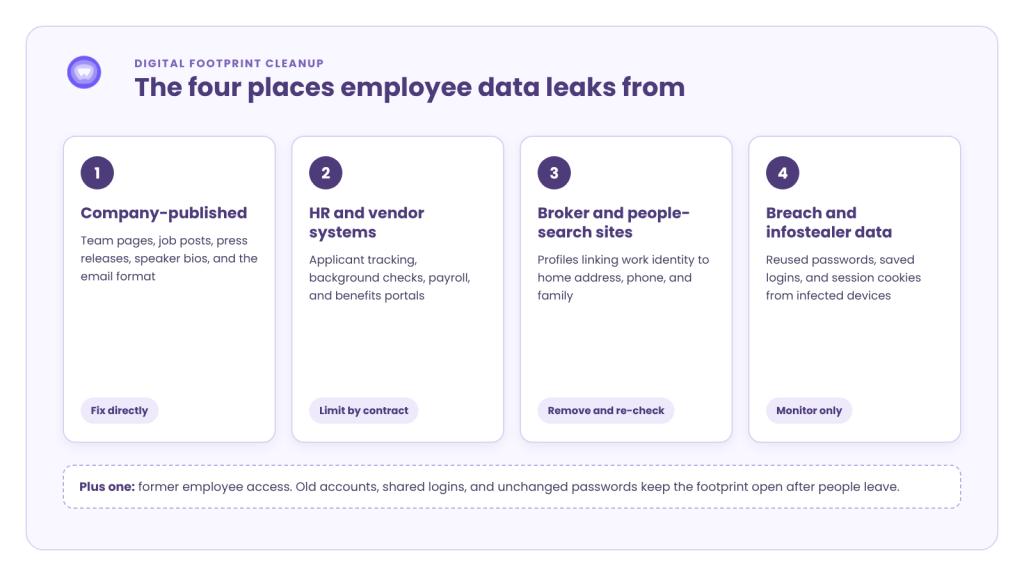
Most cleanup advice treats the footprint as one pile of data. In practice, it comes from four different sources. Each source has a different owner and a different fix.
1. What the Company Publishes Itself
The first leak source is the company’s own website and channels. Leadership pages, press releases, and conference speaker bios name people and roles. Job posts often reveal the tech stack, the reporting line, and the hiring manager.
The email format is part of this layer too. Once an attacker sees two real addresses, the pattern exposes everyone else. Common examples include:
- Team pages that list finance, payroll, and IT staff by name
- Job posts that name internal tools and approval chains
- Press releases that quote new hires with full titles
- Event pages that publish speaker emails and phone numbers
This layer is the easiest to fix, because the business controls it directly.
2. HR, Recruiting, and Vendor Systems
The second source is the data HR collects and shares. Applicant tracking systems, background check firms, payroll platforms, and benefits portals all hold employee records. A breach at any of those vendors leaks staff data the business never published.
Recruiting creates a second risk. Scammers copy real job posts and pose as the company’s recruiters. The FTC reported that job scam losses grew from $90 million to $501 million between 2020 and 2024. Each fake offer uses the real employer’s name and public hiring details.
3. People-Search Sites and Data Brokers
The third source sits outside the company entirely. People-search sites and data brokers build profiles from public records, purchase histories, and app data. For example, one profile can link a work identity to a home address, phone number, and family.
This is the layer that powers the most convincing pretexting. A caller who knows an employee’s manager, home city, and spouse’s name sounds legitimate. Also, these listings are the hardest to see, because they never touch company systems.
4. Breach Dumps and Infostealer Logs
The fourth source is stolen data. Old breach dumps pair work emails with reused passwords. Newer infostealer logs capture saved logins and session cookies from infected browsers, often on personal devices.
This layer overlaps with credential exposure monitoring, which matches leaked records to a company’s domains. For a footprint program, the key point is simple. No one can pull these records out of criminal markets. Teams can only detect them fast and make them useless.
Plus One: Former Employee Access
Offboarding gaps add one more layer. A July 2025 survey covered 1,200 US workers. 4 in 10 said they had used a former employer’s logins. Among them, three in five said the password had never changed.
As a result, old accounts, shared logins, and forgotten vendor seats extend the footprint after a person leaves.
What Can Be Removed, Fixed, or Only Monitored
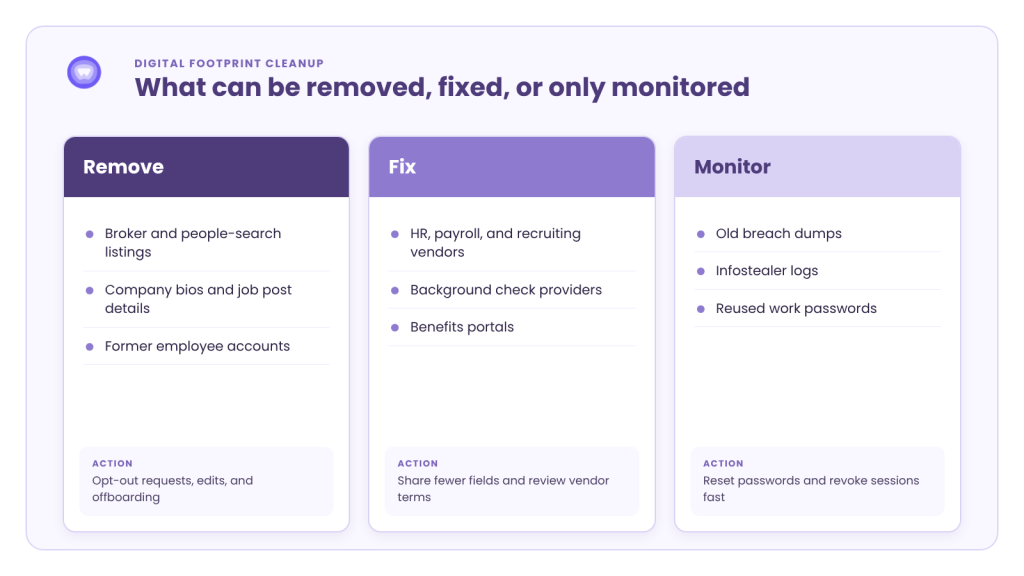
A digital footprint cleanup plan needs one honest rule. A team cannot delete every leak. The table below sorts each source by owner and by the action that actually works.
| Leak Source | Typical Owner | Best Action | Can It Be Removed? |
|---|---|---|---|
| Company website, bios, job posts | Marketing and HR | Edit or trim the content | Yes, directly |
| HR, payroll, and recruiting vendors | HR and procurement | Limit shared fields, review vendor terms | Partly, through contracts |
| People-search sites and data brokers | Employee, with employer support | Submit opt-out requests and re-check | Yes, with repeat requests |
| Breach dumps | Security | Reset passwords, enforce MFA | No, monitor only |
| Infostealer logs | Security | Revoke sessions, clean the device | No, monitor only |
| Former employee access | IT and HR | Close accounts on the last day | Yes, through offboarding |
In short, broker listings and company content can shrink. Teams can only find stolen credentials fast and cut them off.
Who Owns Digital Footprint Cleanup Inside a Business
Ownership is where most programs stall. Security sees the risk, but HR holds the employee relationship. Neither team can run the full program alone.
The Security Team
The CISO’s team sets the threat model. It decides which roles face the most risk and which signals trigger action. It also owns breach and infostealer alerts, since those connect to account takeover.
The HR Team
HR owns consent and communication. However, an employee’s home address on a broker site is personal data, not company data. So enrollment must be opt-in, and HR should explain what the service does and what the employer can see.
A good rule keeps personal details on the employee side. Security receives counts and risk levels. It does not receive home addresses or family names. That split protects trust and keeps the program clear of monitoring concerns.
The MSP
Many smaller businesses have no dedicated security or privacy staff. For them, MSPs can run the program as a managed service. The MSP handles enrollment, removal tracking, and alert triage, while the client keeps the consent decisions.
A Digital Footprint Cleanup Plan in Five Steps
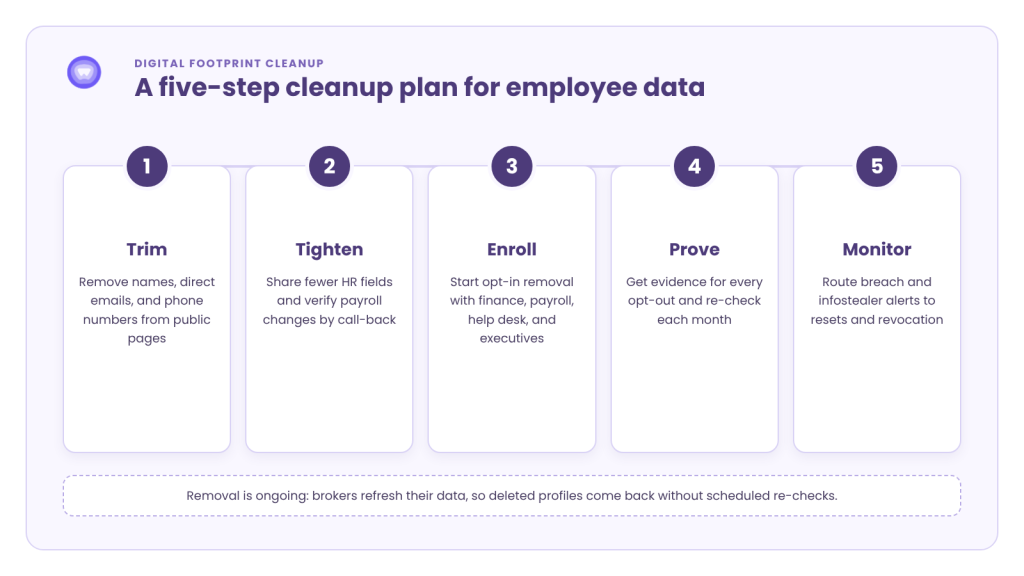
The steps below follow the four leak sources in order. Each one is small enough to start this quarter.
Step 1: Trim What the Company Publishes
Start with the content the business controls. Review public pages for names, direct emails, and phone numbers that serve no customer purpose.
- Replace named finance and payroll contacts with shared role inboxes
- Remove internal tool names from job posts
- Strip direct phone numbers from speaker bios
Step 2: Tighten HR and Vendor Data Flows
Next, check what HR shares and with whom. In practice, each vendor should receive only the fields it needs. Payroll change requests should always require a call-back to a number already on file.
Step 3: Enroll High-Risk Roles First
Then pick the first group for personal data removal. Executives matter, but they are not the only target. Pretexting often aims at people who can move money or reset access.
- Finance and accounts payable staff
- Payroll and HR administrators
- IT help desk and identity admins
- Executives and their assistants
Step 4: Remove, Prove, and Re-Check
After enrollment, submit opt-out requests to people-search sites and brokers. Ask for proof of each request, not just a final count. Then schedule re-checks, because listings return.
Step 5: Monitor What Cannot Be Removed
Finally, watch the layers that cannot be deleted. Feed breach and infostealer alerts from a monitoring API into password resets and session revocation. Add footprint checks to offboarding, so departing staff do not leave active accounts behind.
Why One Cleanup Pass Is Not Enough
Digital footprint cleanup is not a one-time project. Brokers refresh their data from new sources, so deleted profiles reappear.
A Consumer Reports study tested seven paid removal services across 13 people-search sites. After four months, the services had removed only 35% of profiles. The study also found some data left behind in every case.
That result shapes how a business should judge any provider. Digital footprint cleanup for businesses needs three things: broad site coverage, evidence for every request, and scheduled re-scans. A tool that reports one clean sweep and stops will miss the relisted profiles.
How PureWL Helps
PureWL offers Digital Privacy Protection as a white-label product, with HR and employee benefits among its listed industries. It combines dark web monitoring with opt-outs across 400+ people-search and broker sites. Re-checks run monthly, and evidence scans show listings with screenshots. Partners can embed it through an API and SDK, or use a hosted, branded dashboard.
The data removal layer tracks each opt-out request with live status updates. PureWL states that it cannot promise every trace disappears, but it can prove every request it makes. The platform holds ISO 27001 and SOC 2 Type II certifications. PureWL shares the full audit reports with partners under NDA.
Conclusion
Employee data leaks from four places: company pages, HR and vendor systems, broker sites, and stolen data. Each needs a different owner and a different fix. Digital footprint cleanup starts with what the business controls, then moves to opt-in removal for high-risk roles.
The work continues after the first pass. Re-checks catch relisted profiles, and monitoring catches what removal cannot reach. A business that runs digital footprint cleanup on a schedule gives attackers far less to work with.
Request a 20-minute margin and audit-scrutiny review.
It reduces the employee data attackers use, across company pages, vendors, broker sites, and breach records.
Yes, through opt-out requests, but enrollment should be opt-in because broker listings hold personal data.
Start with finance, payroll, HR admins, IT help desk staff, and executives, because they move money or access.
Run re-checks monthly, since one tested set of removal services cleared only 35% of profiles in four months.
No, those records stay in criminal markets, so teams reset passwords and revoke sessions instead.