

- Credential exposure monitoring watches breach dumps, stealer logs, and criminal markets for logins tied to a company domain.
- Matching works two ways: the email domain in the username, and the company login page stored in stealer logs.
- Login URL matches surface customer accounts on a SaaS product, which username matching alone never finds.
- Fresh stealer records outrank old breach data, since half of ransomware victims with leaks saw them within 95 days.
- Full coverage needs every domain registered, including login subdomains, acquired brands, and contractor domains.
Quick Answer: Credential exposure monitoring watches breach dumps, infostealer logs, and criminal markets for logins tied to a company domain. It matches both employee email addresses and the company’s own login pages. Each match arrives with a source, a date, and a credential type. That tells the team what to reset first.
A stolen work login rarely stays quiet for long. The 2026 Verizon breach report tracked ransomware victims with a prior credential leak. Half of them saw that leak within 95 days of the attack. That gap is the window where a company can still act. Credential exposure monitoring exists to find the leak inside that window.
Most explanations describe it as a dark web scan for passwords. That description hides the parts that decide whether alerts are useful. This guide covers how a corporate domain gets matched and what one exposure record contains. It also shows which domains teams forget to register. Finally, it explains why product teams now offer credential exposure monitoring to their own customers.
What Credential Exposure Monitoring Actually Does
At its core, credential exposure monitoring checks leaked data against the names and domains a company owns. The main one is the work email domain, such as company.com. So instead of checking one inbox at a time, it watches every address on that domain at once.
The data comes from five main places, and each one acts in its own way:
- Breach dumps: Large files from hacked third-party sites, often years old and shared many times.
- Combolists: Username and password pairs built for login-guessing tools.
- Infostealer logs: Fresh records taken from infected devices, with saved passwords and browser cookies.
- Paste sites and forums: Fast, short-lived posts where attackers share samples or full dumps.
- Marketplaces: Listings that sell access, often filtered by domain or privilege level.
A monitoring API normalizes these formats into one structure. After that step, a match against company.com looks the same whatever source produced it.
Three Things People Call “Domain Monitoring”
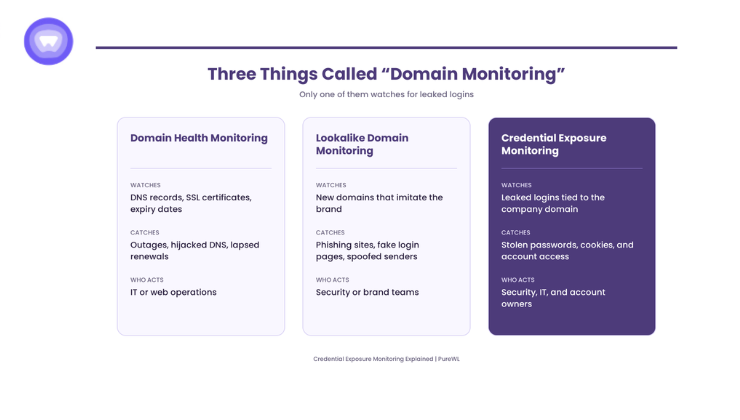
The phrase “domain monitoring” covers three different services, and buyers often mix them up. Each one answers its own question. Of the three, only the last one is credential exposure monitoring.
| Type | What It Watches | What It Catches | Who Acts on It |
| Domain health monitoring | DNS records, SSL certificates, expiry dates | Outages, hijacked DNS, lapsed renewals | IT or web operations |
| Lookalike domain monitoring | New registrations that imitate the brand | Phishing sites, fake login pages, spoofed senders | Security or brand teams |
| Credential exposure monitoring | Leaked logins tied to the company domain | Stolen passwords, cookies, and account access | Security, IT, and account owners |
The first two protect the domain itself. Credential exposure monitoring protects the people and accounts behind the domain. A company can run all three, yet none of them replaces the others.
How a Corporate Domain Gets Matched
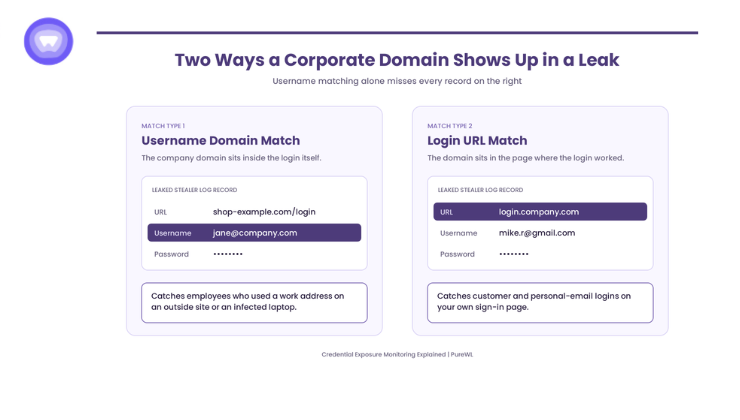
Matching sounds simple, but a corporate domain can show up in a leak in two places. Each one tells the team something different. Then a third step, proof of ownership, controls who sees the results at all.
Username Domain Matches
The first match type looks at the username field. If a leaked record reads [email protected], the domain sits inside the login itself. This catches employees who used a work address on an outside site that later suffered a breach. It also catches work logins stolen straight from an infected laptop.
Login URL Matches
The second match type looks at where the credential was used. Infostealer logs store the web address of each saved login, not just the username and password. So a record can point to login.company.com while the username is a personal Gmail address.
This matters most for SaaS platforms. A login URL match on the product’s own sign-in page exposes a customer account, not an employee account. Username matching alone never surfaces those records. That gap explains why account takeover reports often arrive at the support desk before the security team sees anything.
Domain Verification Before Any Results
Before any matching starts, a reputable service makes the company prove it owns the domain. The usual methods are a DNS record or a one-time code sent to an address on that domain. Without this step, anyone could look up another company’s exposure. Verification keeps the results private to the domain owner.
What One Exposure Record Contains
A useful alert carries more than a found email address. The details inside each record decide how fast the team can respond. Strong services include most of the following fields:
- Source type: Breach dump, combolist, stealer log, or market listing.
- First-seen date: When the record first showed up, which splits fresh leaks from old ones.
- Credential type: Password, session cookie, API key, or recovery details.
- Password form: Plaintext, hashed, or partially masked.
- Login URL: The site or internal app where the credential worked.
- Device context: For infostealer records, the infection date and whether cookies came with the passwords.
Cookies deserve special attention. Stolen session tokens let an attacker reuse a live session without the password. In that case, a password reset alone does not end the threat.
Why Fresh Exposures Matter More Than Big Numbers
Exposure dashboards often lead with a total count of leaked records. That number mostly reflects old breaches that already cycled through criminal markets. In practice, the records that predict an attack are recent ones from infostealer logs.
Last year’s Verizon report made that link clear. Its stealer log analysis found that 54 percent of ransomware victims had their domains in stealer logs. Also, personal devices made up 46 percent of the infected systems. Those devices sit outside the company’s own security tools. So the leak stays hidden from inside.
The 2026 edition adds a key detail. For the first time, software flaws passed stolen logins as the top way in. Even so, the 95-day gap between leak and ransomware shows stolen logins still feed the worst attacks.
Meanwhile, slow discovery stays costly. IBM’s 2026 research puts the average breach cost at $4.99 million. Firms also took an average of 247 days to find and contain a breach. Credential exposure monitoring cuts the front end of that timeline. It flags the leak before anyone logs in with it.
The Domain Inventory Most Teams Miss
Coverage depends on the domain list a company registers. Most teams add their main email domain and stop there. However, attackers find the gaps in that list first.
A complete inventory usually includes:
- Login subdomains: The sign-in host, admin panels, and customer portals that show up in login URLs.
- Acquired company domains: Old addresses that still get mail or still open old accounts.
- Regional domains: Country versions that local teams use each day.
- Support and marketing domains: Addresses tied to help desk tools, newsletters, and ad accounts.
- Contractor domains: Agencies and freelancers who hold access under their own email addresses.
- Executive personal addresses: Watched with consent, since attackers often reach leaders through home accounts.
The personal device finding above shows why this list matters. Work logins often sit on home laptops, saved in personal browser profiles. Because of that, coverage that checks login URLs still catches those records when the username is a personal address.
What Happens After an Alert
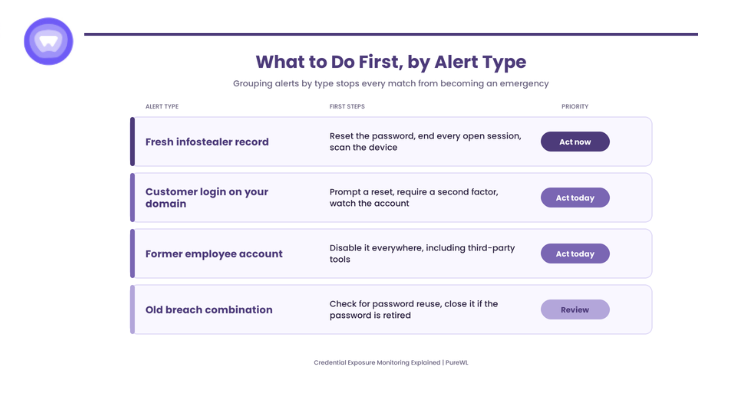
An alert only helps if someone owns the response. Different record types call for different first steps. Grouping alerts by type keeps teams from treating every match as an emergency.
A Fresh Infostealer Record
Treat this as a live break-in. Reset the password, end every open session, and check the device for malware. Fast session revocation matters here, because cookies can outlive a password change.
An Old Breach Combination
Check whether the leaked password still works anywhere. Old records turn dangerous through password reuse across work and personal accounts. If the password is retired, log the record and close it.
A Former Employee Account
Confirm the account is disabled everywhere, including third-party tools. Offboarding gaps show up here more often than teams expect. One stale contractor login can stay valid for months.
A Customer Login on the Product’s Domain
For SaaS platforms, this is an account takeover warning. Prompt the customer to reset, require a second factor at next login, and watch the account for unusual activity. Handling this early prevents a support ticket from becoming a churn event.
Why Security Vendors and SaaS Platforms Offer It to Customers
Credential exposure monitoring began as a tool security teams ran for themselves. Now, product teams at security vendors and SaaS companies sell it to their own customers. For example, security vendors add it to suites they already sell. Meanwhile, SaaS platforms place it in admin panels so each customer can watch its own domain.
The customer version needs a few extra parts. First, each customer proves it owns its domain, and alerts go to that customer only. Next, the product needs clear risk levels, so customers know which matches need action today. Still, the data pipeline behind all of this is a separate business from most core products.
For that reason, many product teams license the monitoring layer and build the experience around it. That way, the data sources, parsing, and matching stay with a specialist provider. The product team owns the branding, the alert design, and the customer relationship.
How PureWL Supports Credential Exposure Monitoring
PureWL Digital Privacy Protection gives partners dark web monitoring under their own brand. Product teams add it through an API and run it inside the apps they already ship. In turn, partners keep the customer, the pricing, and the alert design.
The same product also offers data broker opt-out as a second module. So partners can start with monitoring and add removal later, with no second build.
Conclusion
In short, credential exposure monitoring shows which work logins criminals already hold. To do that well, it must match both usernames and login URLs. It also needs proof of domain ownership and a full list of company domains. Finally, it must split fresh stealer records from old, recycled breach data.
For product teams, the same tool also works as a feature that buyers notice at renewal time. So credential exposure monitoring turns a silent leak into a clear, dated alert. Request API sandbox access for a 20-minute integration walkthrough.
Frequently Asked Questions
It is continuous scanning of breach dumps, infostealer logs, and criminal markets for logins tied to a company domain.
Domain monitoring covers every address under company.com at once, while email monitoring checks one inbox at a time.
Yes. Login URL matching flags any leaked credential used on the company's own sign-in pages, whatever the username.
Verification through a DNS record or one-time code stops anyone from viewing another company's exposure data.
Fresh infostealer records come first, since half of ransomware victims with prior leaks saw them within 95 days.