

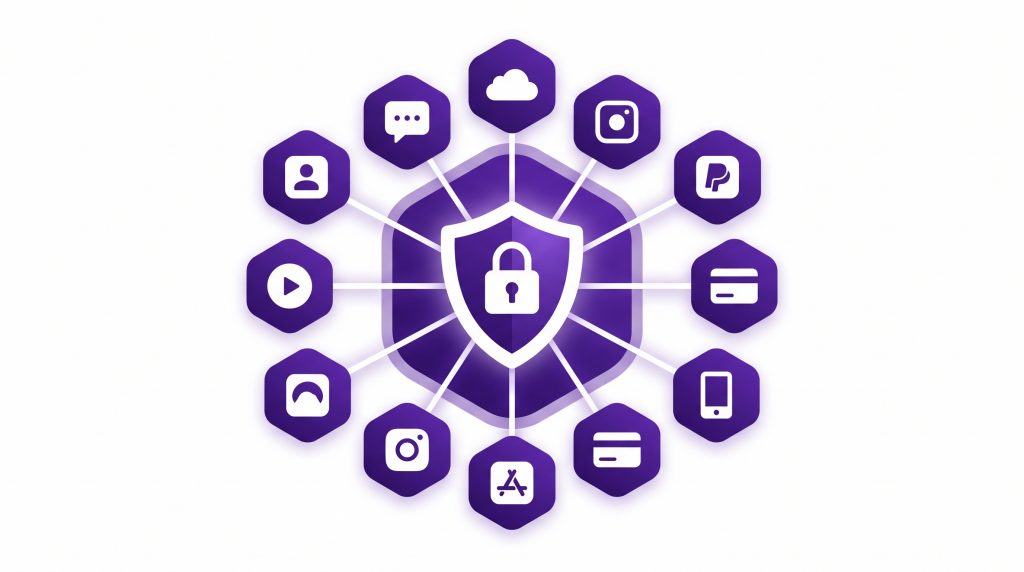
- App-Embedded VPN: Embedded VPN must handle your app’s lifecycle directly. Unlike standalone VPN clients, it needs to survive background states, network switches, and reconnect silently, or your support queue absorbs the blame.
- Protocol Choice: Protocol choice determines your churn risk. Stateless protocols switch networks in under 50 milliseconds and suit consumer apps, while session-based protocols create audit trails needed for regulated data like health and finance.
- Silent Disconnections: Silent disconnections are the top cause of support tickets. One case study saw 847 tickets and $91,500 in remediation costs after callbacks failed to fire when the app was backgrounded, proving that pairing callbacks with polling is not optional.
- DNS and IPv6 Leaks: DNS and IPv6 leaks destroy trust instantly. Security-conscious users test for leaks within hours of install, and a single leaked query is enough to trigger churn and negative reviews.
- Kill-Switch Design: Kill-switch design is a make-or-break decision. Strict kill-switches frustrate casual users, while graceful degradation (blocking only critical operations like payments) preserves usability without sacrificing security.
B2B SaaS teams see VPN as an optional add-on feature. The reality differs. When business users connect through your productivity app on public WiFi, a white label VPN integration becomes a trust liability if it fails silently. Engineering leads must know whether the embedded VPN will work when networks change. They need to detect outages and communicate status honestly. This is where white label VPN vendors separate thoughtful implementations from oversimplified ones.
A true white label VPN for secure apps solves operational problems. Generic VPN software packages leave session management, state detection, and failure modes to your team. The white label VPN for apps that works handles these upfront.
Since April 2022, Google Play has required every app to disclose its data-handling practices through a Data Safety declaration before install, and Apple has required a privacy label since December 2020. Neither requirement audits your VPN’s actual behavior, so an app can declare strong privacy practices on its store listing while the embedded tunnel drops silently or leaks DNS in the background. The scrutiny has moved to the listing page. What happens inside the app during a network switch is still on you to get right.
Why App-Embedded VPN Differs From Standalone
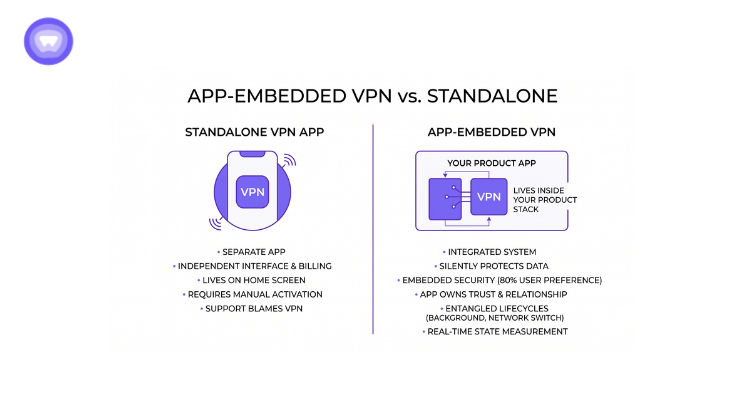
A standalone VPN app controls its own interface and billing independently. It lives on a user’s home screen as a separate tool.
An embedded VPN lives inside your product stack. Users expect it to work silently. When it breaks, your support queue fills. Tickets blame your app, not the network layer beneath it.
The distinction matters for three reasons:
First, your app owns the user relationship and trust signals. Users want your app protecting data now. They do not want to delegate to external tools.
Second, your app’s lifecycle and the VPN’s connection lifecycle are entangled. If your app goes to background, does the VPN stay connected? If the user switches from WiFi to cellular, does the tunnel re-establish or fail silently? These are app-specific questions.
Third, your app can measure VPN state in real time. A push notification arrives. The tunnel drops during delivery. Your app detects this and surfaces a message, or retries only when re-established. Standalone VPN clients provide no hooks for this logic.
Session State and Network Switching
The first technical choice product teams face is session state handling during network changes. This choice directly impacts user experience and support volume.
A user opens your app and connects. They load sensitive data or submit a transaction. Their phone switches from WiFi to cellular mid-request. What happens to the session state? Does the tunnel stay alive? Does the request retry automatically? Is the user left waiting?
Session Persistence Without Encryption Bleed
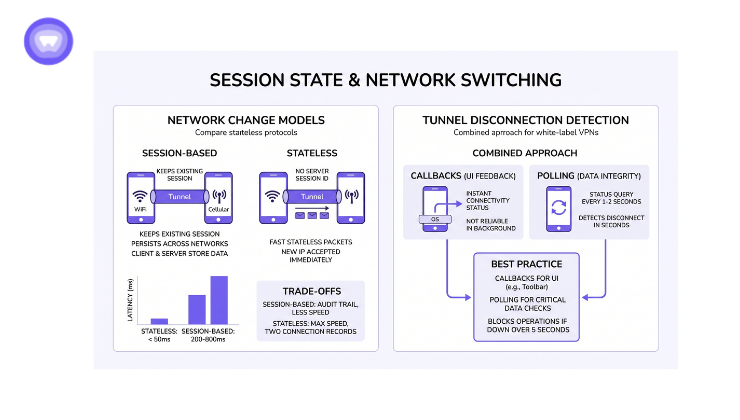
Most embedded VPN packages offer two models: session-based protocols with built-in network-switching support, or stateless protocols with session resumption. Each has a trade-off that affects user experience directly. The wrong choice here drives support tickets and churn.
Session-based protocols were designed for mobile networks. When your network changes, the existing session persists across networks without forcing the connection to drop. The tunnel re-establishes using the same session reference. This means in-flight requests can sometimes complete without interruption. The cost is that both client and server store session data for the lifetime of each connection.
Stateless protocols take a different approach. They store no session ID on the server. Each data packet carries its own encryption key. The server maintains only public keys and temporary state. When your network changes and your IP shifts, the next packet carries your new IP but still uses your existing encryption key. The server accepts it immediately without re-establishing anything. This is faster and creates no persistent link between your old and new IP. For audit purposes, this means two separate connection records instead of one continuous session.
For regulated data (financial, health), the audit trail matters. For apps prioritizing experience, stateless protocols offer faster re-establishment.
Detecting Silent Disconnections
The second decision is how your app detects tunnel disconnects. Silent disconnects (where the tunnel drops but your app does not know) are the reason support tickets spike after network changes.
Most white-label VPN packages offer callbacks when connection state changes. Your app registers a listener. When disconnected, the callback fires. The issue: callbacks may not fire if your app backgrounded or the OS deprioritizes your process. In low-memory conditions, operating systems can deprioritize background network activity.
Polling is a complementary approach. Your app queries status at set intervals. This matters for apps with “sync over VPN only” flags. If VPN drops while offline, polling can detect it and warn before submission.
Best practice: consider both approaches for different purposes.
- Callbacks work well for UI feedback (“VPN Connected” in toolbar)
- Polling works well for data-integrity checks (block critical operations if the tunnel state cannot be confirmed)
See how VPN works to understand PureWL’s implementation pipeline.
Trust Signals: DNS Leaks and IPv6
A white-label VPN positioned as security attracts security-conscious users. These users test your app. They may run DNS leak tests, IPv6 tests, and kill-switch tests after installing. If you fail these tests, churn risk increases and negative reviews can follow.
DNS leaks are a common failure mode. If requests bypass the tunnel and leak to your ISP’s resolver instead of the VPN resolver, the VPN provides no privacy benefit for that traffic. A leaked DNS query to an ISP resolver is visible to packet inspectors, ad networks, and ISP monitoring tools.
iOS and Android Handle DNS Routing Differently
On iOS, modern network frameworks respect the VPN tunnel if apps use standard iOS connection methods. Older connection methods or direct socket access may bypass the tunnel entirely. On Android, the VPN service layer enforces DNS routing, but only if your app has not added system-wide override settings that bypass it.
Hardcoding a specific DNS resolver address instead of using the system’s resolver is a known way DNS leaks occur in embedded apps. Switching to the system resolver typically resolves this.
IPv6 Adds Complexity
Older VPN infrastructure sometimes routes only IPv4. Modern IPv6 splits DNS v6 (AAAA) from v4 (A records). IPv4-only VPN can cause fallback to IPv6 queries, which then leak outside the tunnel. A white-label VPN without clear IPv6 handling is a liability.
Kill-Switch Design
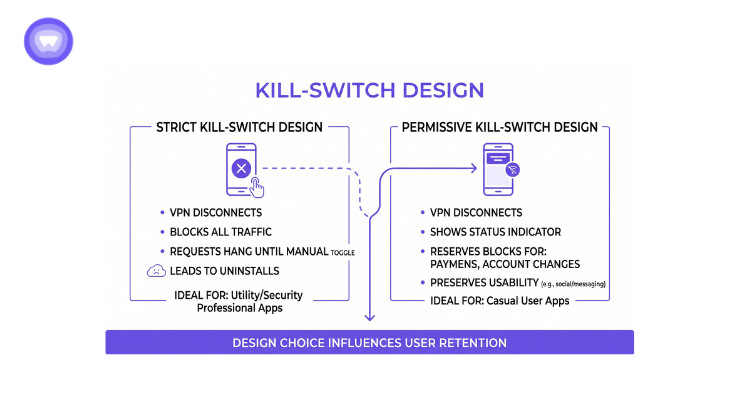
A kill-switch cuts internet access if the VPN drops. On first glance, this is pure security. In practice, kill-switches can frustrate users if not tuned for embedded apps. This design choice can influence whether users stay or leave.
Strict kill-switch design means all requests hang on VPN disconnect until the user manually toggles. This fits utility apps built for security professionals. For social or messaging apps used by casual users, this design can drive uninstalls. Users expect to see the network icon, not a frozen screen.
A more permissive design shows a status indicator when the VPN disconnects rather than blocking all traffic outright, reserving hard blocks for the most sensitive operations (payments, account changes). This preserves usability while still protecting sensitive operations.
Comparing Delivery Models
Each delivery model solves different problems. Session-based embedded SDKs suit apps handling regulated data where audit trails matter. Stateless embedded SDKs suit consumer apps where speed and seamless network switching matter more. Branded standalone apps suit vendors starting their own VPN business. API-only models suit backend infrastructure teams.
| Delivery Model | Best For | Setup Time | Session Control | DNS/IPv6 Auditable | Cost Per User |
| Embedded SDK (Session-Based) | Health, Finance, Regulated Data | 4-8 weeks | Server-side session tracking | Yes, audit trail | $0.50-$1.50/mo |
| Embedded SDK (Stateless) | Consumer Apps, Speed-Critical | 2-4 weeks | Stateless, client-side logic | Yes, audit trail | $0.40-$1.20/mo |
| Branded Standalone App | VPN Business, Brand Control | 6-12 weeks | User-facing only | Not from app perspective | $2-$5/mo |
| API-Only (No App) | Backend Tunneling, B2B | 1-2 weeks | API-driven provisioning | Yes, server logs | $0.20-$0.60/mo |
Note: setup time and cost figures above are general industry ranges, not vendor-specific quotes. Confirm exact figures directly with your chosen vendor.
Why Integration Depth Matters More Than Launch Speed
A fast, undocumented VPN integration creates hidden risk. If a vendor does not document background-state behavior, DNS routing, or kill-switch tuning per platform, your engineering team inherits that gap after launch, often in the form of support tickets and churn tied to security concerns.
This is not theoretical. In PureWL’s own productivity app case study, the client’s churn analysis found that over 30% of users who uninstalled cited a lack of built-in security as a contributing factor. Support tickets and app store reviews had already surfaced the same theme before the fix shipped: business users connecting over public WiFi wanted assurance their data was protected, and some began exploring competing tools that offered it.
Lesson: integration depth (documented background-state handling, DNS routing, kill-switch tuning) is what determines whether embedded VPN reduces churn or creates a new support burden.
How PureWL Powers Embedded White Label VPN
Choosing a provider that documents embedded behavior across platforms, rather than one that leaves session handling and DNS routing undocumented, is what determines whether your team inherits risk after launch. PureWL’s infrastructure, 6,500+ servers across 88+ countries with 150+ active white-label partners, supports both embedded app integration and standalone branded VPN products.
Protocol Flexibility
PureWL gives partners access to OpenVPN, WireGuard, and IKEv2. The platform’s protocol infrastructure is already patched and, in restricted markets, obfuscation-capable.
Case Study: Productivity SaaS Churn Reduction
A globally recognized productivity platform with millions of active users integrated PureWL’s white-label VPN SDK directly into its existing iOS and Android apps, without requiring a separate download. Before the integration, the client’s churn analysis found that over 30 percent of users who uninstalled cited a lack of built-in security as a contributing factor, a pattern that had already surfaced in support tickets and app store reviews from business users connecting over public WiFi.
After the rollout, the client documented an 18 percent reduction in uninstalls linked to improved user confidence in security, along with a 12 percent increase in average session time, particularly among remote teams. In the client’s own words: “Our users immediately noticed the added security” after the feature shipped.
The client is not named in PureWL’s published materials. Full case study.
Authority and Compliance
PureWL’s no-logs policy is backed by a KPMG audit of the underlying PureVPN infrastructure. GDPR compliance documentation is available covering sub-processor rules and data handling for embedded integrations.
Next Steps
Embedding a white label VPN is increasingly treated as a security expectation rather than a differentiator, particularly for apps handling sensitive user data.
To assess whether PureWL fits your integration needs:
- Review the VPN solution architecture documentation
- Evaluate PureWL’s protocol support against your app’s specific requirements
- Read the productivity app case study to understand a documented real-world implementation
The difference between a successful embedded VPN launch and a failed one often comes down to documentation depth and how well the vendor anticipates platform-specific failure modes.