

Key Takeaways
- Infostealer logs carry live session cookies, not just passwords, from every site an infected browser used.
- A stolen cookie skips MFA because it represents a login that already passed every check.
- A password reset does not end a stolen session unless the platform revokes that session directly.
- Chrome’s device-bound sessions help on Windows, but each website must support them on its own servers.
- Platforms close the gap with session binding, full revocation, step-up checks, and exposure monitoring.
Quick Answer: Infostealer logs are files that malware builds from an infected browser. They hold saved passwords, autofill data, and live session cookies. A stolen session cookie lets an attacker reuse a login that already passed MFA. Platforms stop that replay by binding sessions to devices and revoking sessions the moment exposure appears.
A user can pass every MFA prompt and still lose the account an hour later. The reason sits inside infostealer logs. These logs carry the session cookie a platform issues after login. That cookie proves the login already happened, so nobody asks for a second factor again.
The scale is large. Microsoft found more than 394,000 infected computers running a single infostealer family in just two months of 2025. Each infected browser can hold dozens of live sessions across work and personal apps.
For SaaS platforms and security suites, that number turns into a support and churn problem. Consider an illustrative platform with 100,000 active users. If 0.2 percent sit on infected devices, 200 accounts carry live sessions in criminal hands. None of those replays trip a failed login alert. The first signal is often a customer complaint.
This guide explains what infostealer logs contain and how stolen cookies bypass MFA. It also covers why browser fixes keep falling behind. Finally, it lays out the controls platforms own on their own servers.
What Infostealer Logs Actually Contain
An infostealer runs quietly, copies browser data, and sends it to its operator in one package. That package follows a predictable structure. Three parts matter most to platforms.
Saved Passwords and Autofill Data
The log lists every login the browser saved, with the site address beside each one. Autofill adds names, phone numbers, addresses, and card details. Old breach dumps rarely carry this much context in one place.
Session Cookies and Tokens
This part does the real damage. Each cookie represents a session that already cleared the password and MFA steps. Because these logs are machine-generated, parsers read them with high accuracy at scale. Buyers can therefore filter thousands of logs by target site in minutes.
Device and Infection Context
Logs also record the operating system, IP address, and infection date. Buyers use this data to pick fresh logs over stale ones. A recent infection date signals cookies that have not expired yet.
How Stolen Session Cookies Bypass MFA
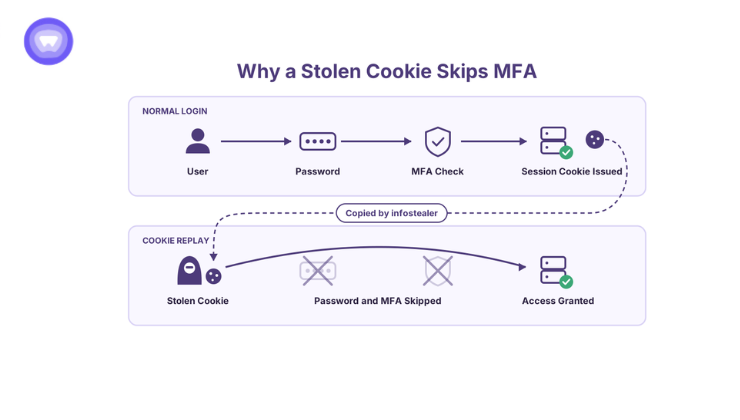
MFA guards one moment, the login. Everything after that moment runs on the session cookie. That split explains the whole attack.
The Pass-the-Cookie Replay
The attacker imports the stolen cookie into their own browser. Next, they open the target site. The server sees a valid session and serves the account. No password field appears, and no MFA prompt fires. From the server side, the request looks like a returning user.
Why a Password Reset Does Not End It
Many platforms reset the password and stop there. However, a password change does not always end existing sessions. The stolen cookie keeps working until the server invalidates that session directly. The leak of 16 billion credentials showed cookies and session tokens traveling alongside passwords in the same datasets.
Phishing-resistant MFA does not close this gap either. Passkeys protect the login step from interception. Yet malware that copies a cookie after login never touches that step.
From Infection to Replay: The Timeline Platforms Miss
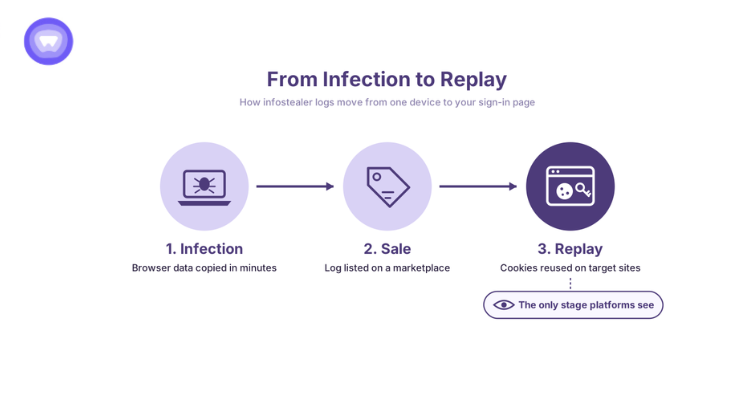
Infostealer logs move through three stages, and each stage runs on its own clock. Platforms see only the last one.
- Infection: A user runs a fake installer, a cracked app, or a lookalike download. The stealer copies browser data within minutes.
- Sale: The operator lists the log on a marketplace or a private channel. Fresh logs sell for more because their cookies still work.
- Replay: A buyer imports the cookies and tests them against high-value sites first. Email, cloud consoles, and SaaS admin panels top that list.
Even at the replay stage, the traffic looks normal. For that reason, defenses built around login events miss the attack entirely.
Meanwhile, the tools behind this pipeline keep getting easier to obtain and more focused. Security researchers recently described one stealer sold as a subscription to low-skill buyers. Its design centers on session cookies rather than passwords.
Why Browser Fixes Keep Falling Behind Infostealer Logs
Browser makers know where stealers dig, so they keep hardening cookie storage. The track record still shows why platforms cannot rely on the browser alone.
Encryption That Lasted Weeks
In July 2024, Google added app-bound encryption to Chrome 127. It tied stored cookies to the Chrome application itself. Within weeks, several stealer families advertised working bypasses, according to TechRadar. Encryption at rest offers little help once malware runs inside the same user account.
Device-Bound Sessions Change the Math
Google then took a stronger step called Device Bound Session Credentials. It reached general availability in Chrome on Windows in May 2026. The feature keeps a private key in the device’s security chip. Cookies stay short-lived, and Chrome proves it holds that key at each refresh. A cookie copied to another machine expires before it does much harm.
Two limits remain. First, the rollout covers Chrome on Windows, not every browser or operating system. Second, each website must support the standard on its own servers to benefit. Until both gaps close, platform-side controls carry the load.
What Platforms Can Do About Infostealer Logs
Platforms own the session layer, so they own most of the fix. Five controls do the heavy lifting, and each one closes a different part of the replay window.
Bind Sessions to the Device
Tie each session to signals from the device that created it. Hardware-backed keys work best where browsers support them. Elsewhere, flag sudden changes in network, location, and browser fingerprint during a session.
Revoke Sessions, Not Just Passwords
Every password reset should end every active session for that account. The same rule applies to MFA changes and recovery email edits. Speed matters here, since webhook-based revocation closes access in seconds while polling leaves minutes open.
Shorten Lifetimes for Sensitive Actions
Long sessions suit casual browsing, not payouts or admin changes. Require fresh authentication before exports, payment edits, new API keys, and user invites. As a result, a stolen cookie reaches less of the account.
Share Revocation Signals Across Apps
Sessions rarely live in one app. A suite with a web console, a mobile app, and integrations holds several sessions at once. The OpenID continuous access standard defines session-revoked and credential-change events for this exact job. One revocation then reaches every connected app.
Act on Exposure Before Replay
The controls above react to suspicious use. Exposure monitoring acts earlier, when a log first surfaces. A match against the platform’s own sign-in page flags a customer account at risk. Login URL matching catches these records even when the username is a personal email.
Signals That Expose a Replay
Some replays still slip through, so detection needs its own rules. Watch for these patterns in session logs:
- A session that continues with no matching login event behind it.
- The same session active from two networks at once.
- A browser fingerprint that changes mid-session without a new sign-in.
- A burst of exports, invites, or payout edits right after a new device appears.
Each control covers a different gap, so most platforms layer them together.
| Control | What It Stops | What It Misses |
| Device-bound sessions | Cookie replay from another machine | Browsers without hardware key support |
| Revoke all sessions on reset | Cookies that outlive a password change | Replays that happen before the reset |
| Step-up for sensitive actions | Payouts, exports, and admin changes | Read access inside the live session |
| Shared revocation signals | Live sessions in connected apps | Apps outside the signal network |
| Infostealer exposure monitoring | The window before first replay | Infections with no log on sale yet |
Turning Infostealer Logs Into a Revocation Workflow
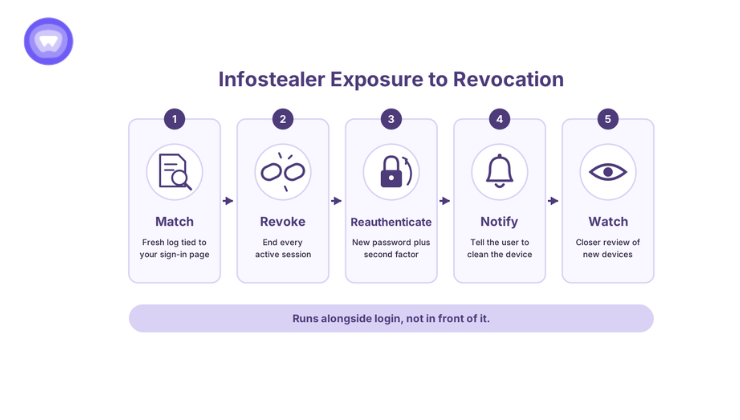
An exposure alert only helps when it triggers action automatically. The workflow below fits most SaaS platforms and security suites. It runs alongside login, not in front of it.
- Match: The monitoring feed returns a fresh infostealer record tied to the platform’s domain or sign-in page.
- Revoke: The backend ends every session for that account across web, mobile, and API tokens.
- Reauthenticate: The next login requires a new password plus a second factor.
- Notify: The user receives a plain message stating that one of their devices shows signs of infection.
- Watch: The account gets closer review for a set period, covering new devices and payout changes.
Step four matters more than it looks. The infected device still holds malware, so it will leak the next session too. Telling the user to clean that device breaks the cycle.
Why Security Suites Need a Post-Infection Layer
Endpoint tools aim to stop the infection itself. When they succeed, no log exists. However, stealers often finish their work in minutes, before a detection update lands. By the time the suite cleans the device, the cookies have already left.
That gap creates a natural feature for security suites. A post-infection check tells the user which sessions left the device and where they surfaced. It turns a silent miss into a visible, dated alert. For the vendor, it also adds a renewal reason that a scan count never provides.
How PureWL Helps Platforms Act on Infostealer Logs
PureWL Digital Privacy Protection gives platforms dark web monitoring under their own brand. Its infostealer coverage reaches credentials, cookies, and device context that basic breach checks miss. Partners embed it through an API and SDK, then route alerts into their own revocation workflow. The platform holds SOC 2 Type II and ISO 27001 certifications, with audit reports shared under NDA.
Demand for built-in protection shows up in an adjacent product line. In one PureWL productivity app case, over 30 percent of uninstalling users cited missing security. That figure comes from a built-in VPN rollout, not dark web monitoring, and reflects the client’s own reporting. Platforms adding that VPN line can start with these vetting questions before signing any vendor.
Conclusion
Infostealer logs turn a finished login into a portable key. MFA still matters, yet it cannot guard a session that already exists. Platforms close the gap by binding sessions to devices and revoking them on every credential change. They also gain time by watching infostealer logs for their own sign-in pages. The platforms that act on exposure first will spend less time on takeover tickets.
Request API sandbox access for a 20-minute integration walkthrough.
What are infostealer logs?
Infostealer logs are malware-built files holding saved passwords, autofill data, session cookies, and device details from one browser.
Can a stolen session cookie bypass MFA?
Yes. The cookie represents a login that already passed MFA, so the server asks for nothing more.
Does changing a password stop a stolen session cookie?
No. The cookie keeps working until the server revokes that session, separately from the password.
Do passkeys stop session cookie theft?
No. Passkeys protect the login step, while infostealers copy the cookie after login completes.
How do platforms stop pass-the-cookie attacks?
They bind sessions to devices, revoke every session on credential changes, and act on infostealer exposure alerts.